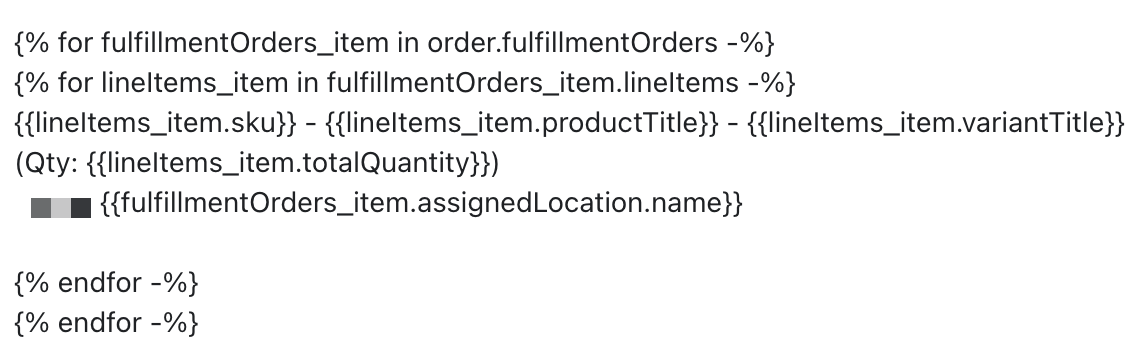
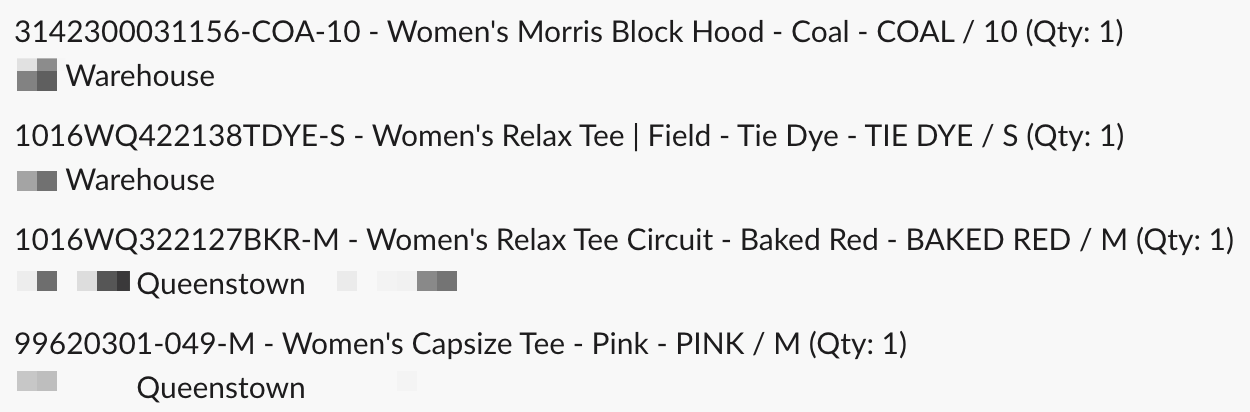
Goal: Automatically list each order line item with quantity and its assigned fulfillment location in a Shopify Flow notification (posted to Slack), and format the message with bullets and a hyperlink to the order.
Key solution: Use fulfillment order data. Location comes from order → fulfillmentOrders → assignedLocation → name. Note: Locations aren’t assigned at order creation, so either add a short Wait (~5 minutes) after “Order created” or use the “Order ready to fulfill” trigger (runs per fulfillment order).
Outcome: The author confirmed this approach worked and shared screenshots of the Flow setup and resulting message (images provided but not essential to reproduce).
Formatting in Slack: Markdown/HTML doesn’t render as expected via Flow. Suggested workarounds: insert a bullet character (•) directly, or add a newline followed by “-” (\n-). For links and allowed formatting, follow Slack’s formatting guide (Slack API reference). Raw HTML/Markdown hyperlinks aren’t supported.
Status: Data retrieval and timing resolved; Slack message formatting has workarounds but remains constrained by Slack’s formatting rules.
I am trying to set up a workflow in Shopify Flow that notifies our warehouse team of fulfilments that are routed to our retail stores so that we can match it in our inventory system.
I’m struggling to find the correct variable to achieve the following output:
SKU123 Product Name1 (QTY: 4)
Fulfilment location: Store 1
SKU321 Product Name2 (QTY: 1)
Fulfilment location: Store 2
SKU000 Product Name2 (QTY: 3)
Fulfilment location: Store 3
What attribute or liquid variable should I be using to re to return this information?
Location is provided in fulfillmentOrders, which are order / fulfillmentOrder / assignedLocation / name or something like that.
A note - the location is not assigned when an order is first created, so you may either need to use a Wait step (~5 min) after order created or “Order ready to fulfill”, which runs per fulfillment order.
Additionally, I would like to have a hyperlink to the order, but the standard html and markdown techniques don’t work there either and the raw URL just gets dumped. Is that a limitation?
For bullets, I think that’s a limit of Slack’s API, but as a workaround I think you can directly insert a bullet character (•). You might also be able to insert a newline followed by -. So: