Hi all. I’m using a Custom Data field to allow to upload a PDF file each product on their Shopify store. The file is going to be downloadable from each product page.
I would like to write a function in C# to upload files via the API but I can’t understand what the correct procedure is.
This is my code example (it doesn’t work):
        public async Task UploadFile(byte[] fileContent, string fileName)
        {
            using (var client = new HttpClient())
            {
                var requestUri = $"https://{_shopifyStoreUrl}/admin/api/2023-10/files.json";
                client.DefaultRequestHeaders.Add("X-Shopify-Access-Token", _accessToken);

                var content = new MultipartFormDataContent();
                var fileContentContent = new ByteArrayContent(fileContent);
                fileContentContent.Headers.ContentDisposition = new ContentDispositionHeaderValue("form-data")
                {
                    Name = "\"file\"",
                    FileName = $"\"{fileName}\""
                };
                content.Add(fileContentContent);

                var response = await client.PostAsync(requestUri, content);
                response.EnsureSuccessStatusCode();
            }
        }
Can you help me understand where I’m wrong?
The response is: “StatusCode: 406, ReasonPhrase: ‘Not Acceptable’”
I can’t speak to the C# code specifically but can point you in the right direction. I don’t think there’s a /files endpoint - but you should be able to create a file with this (GraphQL) mutation.
Hi,
This article is missing the example in “UPLOAD SECTION” of when a generic “FILE” type must be uploaded (in my case a PDF) so I can’t understand if the request must be of type POST or PUT and where (and how) the parameters should be passed.
Can you tell me if for a generic FILE (pdf) type the request must be POST OR PUT and how the parameters should be passed?
In the first step I followed the instructions by putting the type “FILE” and I received the correct parameters but when it says to upload I tried various ways without success.
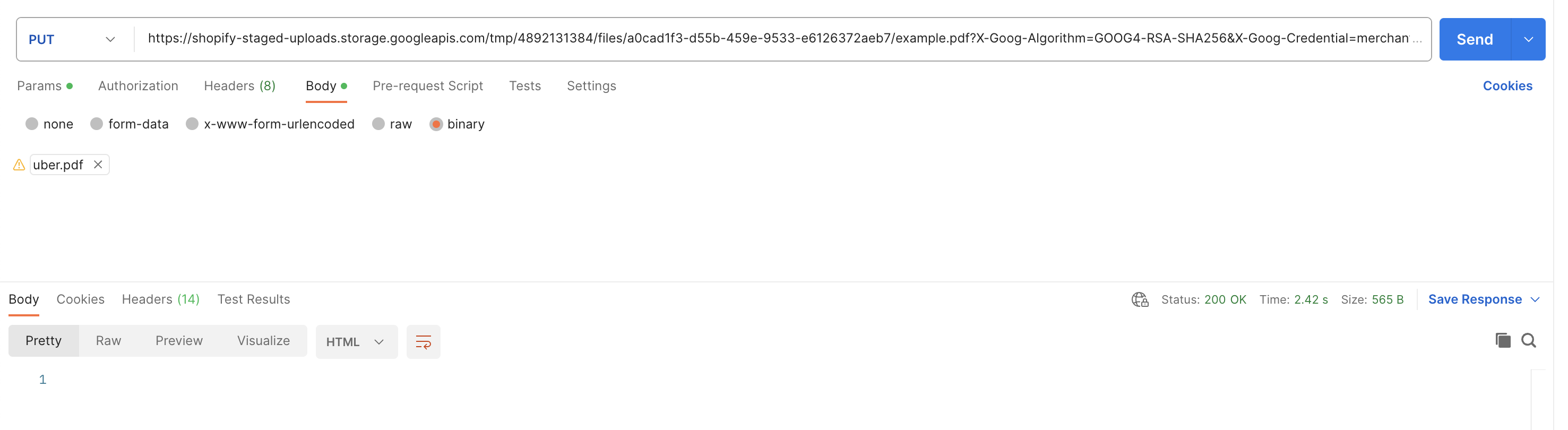
Upload the file (A PUT request to data.stagedUploadsCreate.stagedTargets.url from step 1. If you want to test in Postman here’s an example screenshot.
If you get a 200 OK from step 2, then you can use the fileCreate mutation to add the file to the ‘files’ section of the admin. You only need to pass the originalSource param, which is the data.stagedUploadsCreate.stagedTargets.url value from step one without any of the params.
 I had success with the following method: