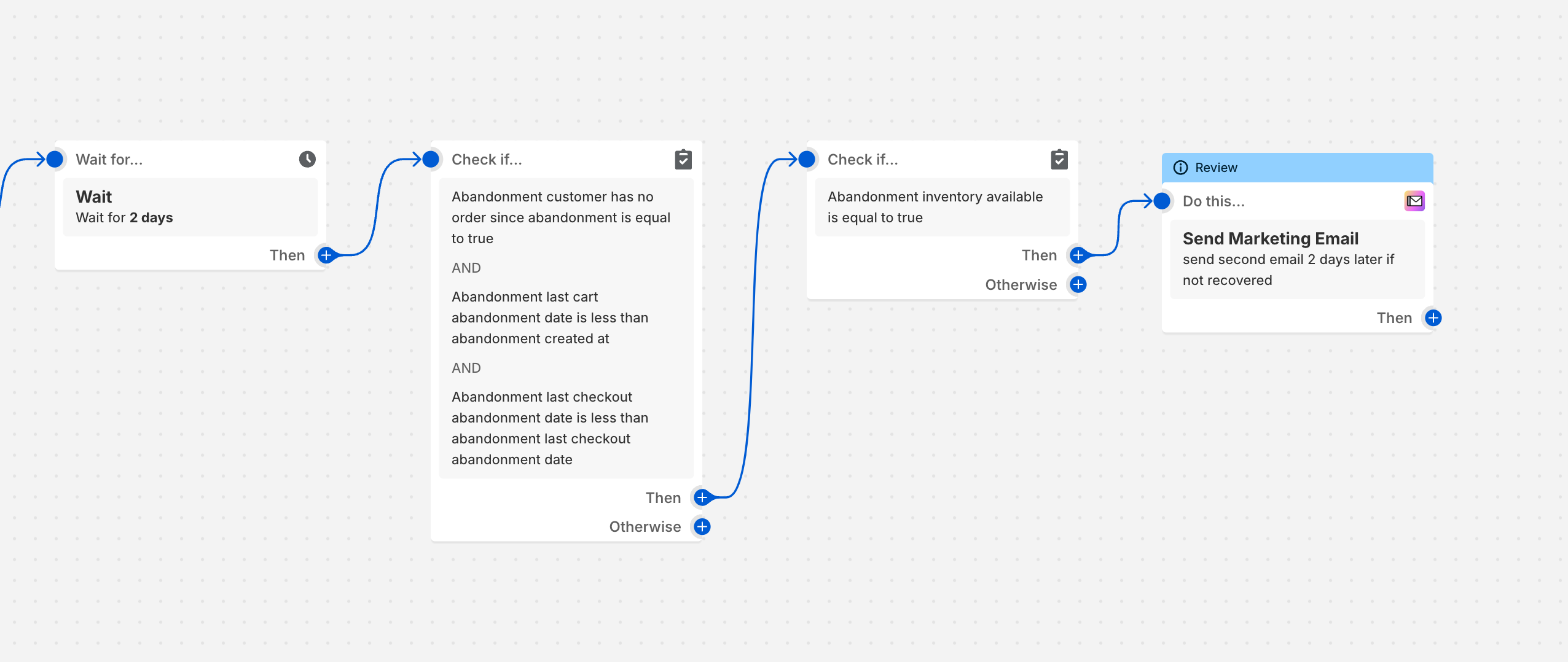
A user wants to extend their abandoned cart email automation to send a follow-up email 2 days after the initial message if the cart remains unrecovered. They’re struggling with the ‘then’ option in their current setup.
Solutions provided:
Third-party app recommendation: Arigato Workflow Automation offers custom workflows with wait durations and pre-built templates for abandoned cart sequences.
Native Shopify solution (most detailed): Add a 2-day wait step after the first email, then insert a condition to verify the cart is still abandoned. Optionally add another condition to check product availability before sending the second email. An advanced option includes checking if the first email was opened using segment filters with the shopify_email.opened() function and a -2d relative date offset.
Alternative app: Retentionly AI Email Marketing provides AI-powered automation with pay-per-email pricing and free setup assistance from their team.
All responses include screenshots demonstrating the workflow configuration steps within Shopify’s built-in marketing automation interface.
Summarized with AI on October 27.
AI used: claude-sonnet-4-5-20250929.
I currently have an automated email set up for abandoned carts which emails the customer on the same day, however I’d like to add onto this to also email them in 2 days should the order not be recovered.
can anyone help please. The final step to the automating so far is the email but there is an option for ‘then’ which I can’t seem to work out.
I’d recommend checking out the Arigato Workflow Automation app. You can create a custom workflow that is triggered when the cart is abandoned and waits for a custom duration. Then, an email will be sent to remind the customer about the abandoned cart. You can also quickly get started by downloading the following workflow template from the automation library: Daily reminder for abandoned cart in Shopify by using Arigato Automation.
Feel free to drop us a line here if you need any help!
Based on your question, I assume you are using Shopify’s built-in marketing automations, and are looking to modify the abandoned cart automation template, so the instructions below are based on that assumption.
First, add a 2 day wait step after the first email. screenshot below.
Then, to check that the cart has not yet been recovered, you can add a condition step (set it up the exact same way as the step from earlier in the flow) screenshot below.
if you want to get more advanced you can check if the first email was opened or not and send a different message based on that result. You would do this using a segment check where the segment uses the shopify_email.opened () filter with a relative date offset of -2d.
Thanks for reaching out and great job setting up your first abandoned cart email. Adding a second follow up after two days is a smart way to increase your chances of recovery.
Shopify’s built-in automation tool (Flow or Email) does support basic flows, but it is difficult to set up multi-step logic, especially when adding conditional branches or delays without custom code.Here’s what you can do:
Inside Shopify Flow, the “Then” option can be used to add a delay, but it requires very specific conditions and isn’t very flexible for complex sequences.
If the flow is only triggering a single email, it won’t automatically send a second follow up unless you build a separate flow or customize using third party tools.
If you’re looking for a more powerful and beginner-friendly solution, I’d recommend checking out Retentionly – AI Email Marketing:
Uses AI and is easy to get started with, especially for beginners
You only pay for the emails you send, not your total subscriber count
The team will set up your email flows for you, completely free
It’s built for Shopify stores and makes it easy to start automating without the usual hassle. let us know on live chat if you need help or have any queries.
Cheers,
Retentionly Team If this helped, please mark it as solved or give it a thumbs up