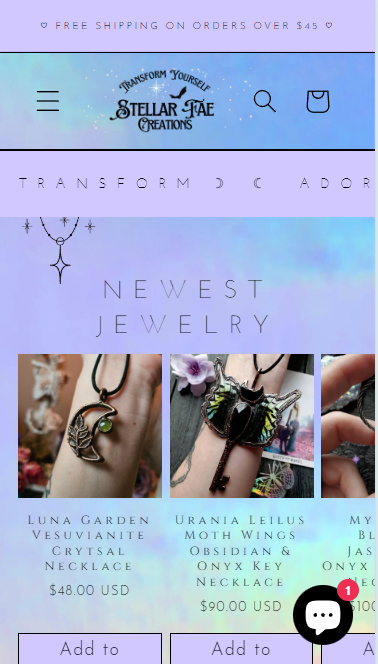
I want to make my logo bigger in mobile. I like the size of it in desktop but want it bigger in mobile.
Any help would be greatly appreciated.
A user wants to increase their logo size on mobile devices while keeping the desktop size unchanged.
Two CSS-based solutions were provided:
First approach: Add custom CSS code to the theme.liquid file, placing it within <style> tags just above the closing </body> tag. This targets mobile viewports using media queries.
Second approach: Modify the base.css file directly by adding media query rules at the bottom that target the header logo class with max-width properties for screens under 767px and 990px.
Both solutions use @media queries to apply styling specifically to mobile screen sizes, allowing independent control of logo dimensions across devices. The code snippets include !important declarations to override existing styles.
I want to make my logo bigger in mobile. I like the size of it in desktop but want it bigger in mobile.
Any help would be greatly appreciated.
Hey @StellarFae
Follow these Steps:
Go to Online Store
Edit Code
Find theme.liquid file
Add the following code in the bottom of the file above tag
RESULT:
If I managed to help you then, don’t forget to Like it and Mark it as Solution!
Best Regards,
Moeed
Hello @StellarFae ,
Go to online online store > themes > edit code > search base.css file
Add the following code in the base.css file at the bottom
@media screen and (max-width: 990px) {
    [id] .header__heading-logo {
        max-width: 120px !important;
    }
}

@media screen and (max-width: 767px) {
    [id] .header__heading-logo {
        max-width: 120px !important;
    }
}
And Save the file.
Thanks!