Hi there I’m hoping anyone can help me, I’m trying to line up the icons horizontally below my links and sign up email tab but I can’t seem to get it to come out of vertical position
Thanks for any help!!
A user is experiencing a CSS layout issue where footer icons are displaying vertically instead of horizontally beneath links and an email signup field. The problem exists in a draft theme currently being updated.
Key Details:
Proposed Solution:
A community member suggested adding CSS code to fix the alignment:
.social-icons {
  display: flex;
  gap: 0.5rem;
}
Current Status:
The original poster has asked for clarification on where to implement the CSS code. The discussion remains open, awaiting instructions on code placement.
Hi there I’m hoping anyone can help me, I’m trying to line up the icons horizontally below my links and sign up email tab but I can’t seem to get it to come out of vertical position
Thanks for any help!!
Hello @Hstoltman ,
I hope you are well!
Can you please provide me the store URL? It will be helpful for me to provide yout the CSS which will horizontally align the email and icons.
I am updating my theme so it is a draft site atm, the one you viewed is live theme
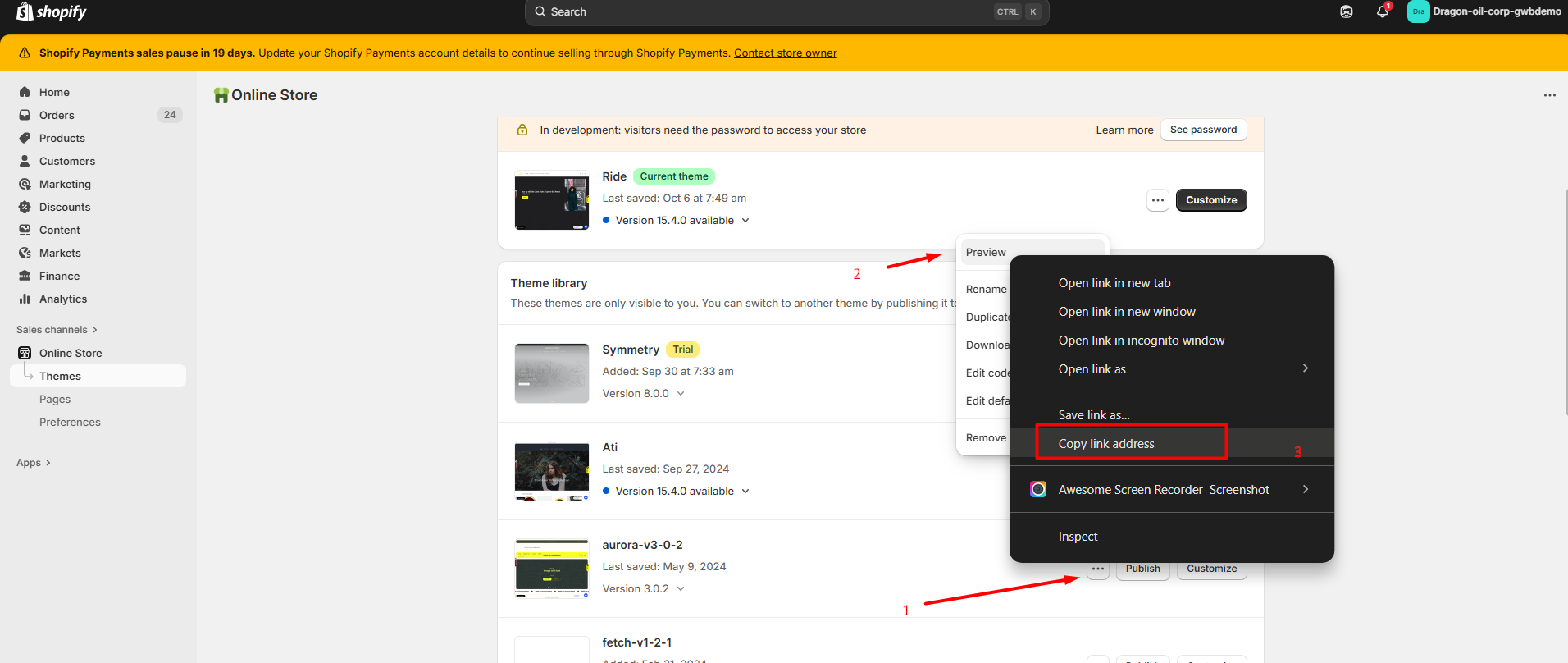
Can you please provide the link of preview theme by going to online store >> Themes >> Click on menu icon >> Right click on preview and copy link address. Now, you just need to paste here.
You may try adding this CSS code:
.social-icons {
  display: flex;
  gap: 0.5rem;
}
Thanks for reply where would I add this?