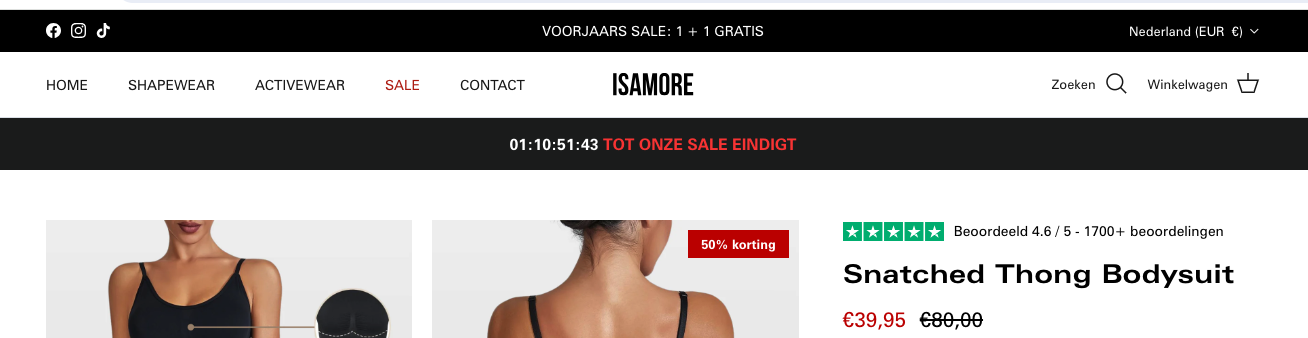
Hello, I’ve added a countdown timer through a custom liquid/css section on my product page: https://isamore.nl/products/snatched-thong-bodysuit?variant=47857096393051
This is the code I’ve used:
<div id="shopify-section-template--21359287632219__custom_liquid_Viebk9" class="shopify-section section-custom-liquid"><div id="section-id-template--21359287632219__custom_liquid_Viebk9" class=" fully-spaced-row--medium section-id-template--21359287632219__custom_liquid_Viebk9">
  <div class="custom-html">
    <div id="shopify-section-template--22213727224103__bf_clock_section_kNBXVU" class="shopify-section">

<div class="timerwrapper">
  <div class="animation-cropper">
<div class="timerwrappermain">

<span style="display:inline;" id="countdown">01:11:05:56</span>
     <span style="display:inline; color: #F83A3A;">TOT ONZE SALE EINDIGT</span>
</div>
</div>
</div>

<script>
document.addEventListener("DOMContentLoaded", function(event) {
  // Set the date we're counting down to
  // var countDownDate = new Date("November 22, 2023 09:00:00").getTime();
  const todayDate = new Date(new Date().setHours(0, 0, 0, 0));
  todayDate.setDate(todayDate.getDate() + 2);
  var countDownDate = todayDate.getTime();

  // Update the countdown every second
  var x = setInterval(function() {

    // Get the current date and time
    var now = new Date().getTime();

    // Calculate the time remaining between now and the countdown date
    var distance = countDownDate - now;

    // Calculate days, hours, minutes, and seconds remaining
    var days = Math.floor(distance / (1000 * 60 * 60 * 24));
    var hours = Math.floor((distance % (1000 * 60 * 60 * 24)) / (1000 * 60 * 60));
    var minutes = Math.floor((distance % (1000 * 60 * 60)) / (1000 * 60));
    var seconds = Math.floor((distance % (1000 * 60)) / 1000);

    // Add leading zeros if the value is a single digit
    days = String(days).padStart(2, '0');
    hours = String(hours).padStart(2, '0');
    minutes = String(minutes).padStart(2, '0');
    seconds = String(seconds).padStart(2, '0');

    // Display the countdown in the element with id="countdown"
    document.getElementById("countdown").innerHTML = days + ":" + hours + ":"+ minutes + ":" + seconds ;

    // If the countdown is over, display a message
    if (distance < 0) {
      clearInterval(x);
      document.getElementById("countdown").innerHTML = "";
    }
  }, 0); // Update every second
});
</script>

<style>


  .animation-cropper {
    overflow: hidden;
}

  #countdown {
  }
  .timerwrapper {
    text-align: center;
    padding: 15px;
    background: #1c1d1d;
    color: white;
        text-transform: uppercase;
    font-weight: 700;
    line-height: 1.4;
  }

  @media only screen and (max-width: 769px) {

    .timerwrapper {
    text-align: center;
    padding: 12px;
    background: #1c1d1d;
    color: white;
        text-transform: uppercase;
    font-weight: 700;
      font-size: 14px;
  }
  }
</style>
</div>
  </div>
</div>

</div>
I’ve copied this from another store.
The countdown timer is working, however there is a lot of padding around the section. How do I remove the padding for this custom liquid section specifically? I’ve used other custom css sections as well, so I don’t want to mess with those. Any help is highly appreciated.

It should look like this: