Hi,
I’m using the Dawn theme.
I added new field “City” to the registration form. so now it looks like this:
But somehow I can’t see the City field in the customer section, there is no ‘City’ tag.
The ‘Location’ field that was already existing doesn’t help much - it shows:
-
only the Country
-
The city only if the customer already purchased something
But I need to know the city the user filled in case he is not a customer yet.
How can I see this information?
Thanks
Hi @Ben1000
The fields that we add as custom field can’t be saved and sorted on customer section. However, you can convert that field entry as tag for city and when customer fill the city and register himself then in the backend. The city name as tag adds, and then you could sort the customers according to their cities.
Thanks
@Sheesh_b
1 Like
Hi @Sheesh_b ,
I made some tests and tried to filter but I don’t see the city name for customers who registered without buying a product yet.
Can you elaborate how I can do it?
Hi @Ben1000
Just follow the steps:
First, see what I tested.
- I created a custom field for city, which is a single line text field
Code used on Shopify Refresh theme
Code:
Which resulted like below.
- Now code is provided and when I submitted the form, a new user is created on the backend and the tag created is ‘Alaska’
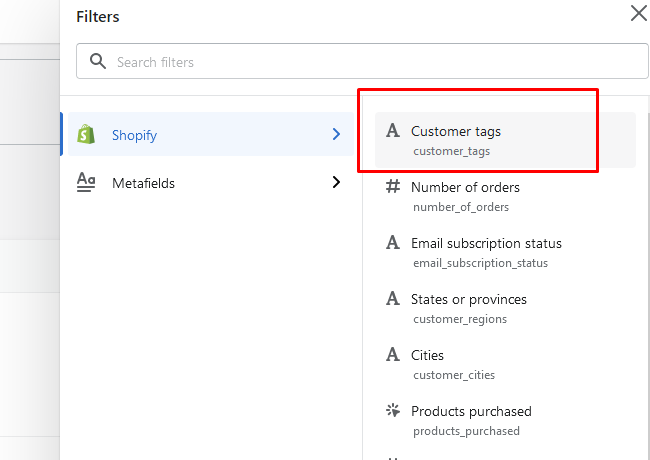
- Now, you can sort users using tag like below:
- I searched for Alaska and this is the result:
I hope this will solve your issue.
Let me know if you still need any assistance.
Thanks
Sheesh
1 Like
Hi @Sheesh_b ,
Is it possible not to search for a specific tag and see all the info, fir example a column that will show me the city? Because I will have many cities and I also can’t guess what all my customers cities.
Hi @Ben1000
Unfortunately, there isn’t a way to add a custom column, which we add in the register form.
Hey @Ben1000 - The only way to add new fields to the customer registration form that sync to the Shopify Admin > Customers page is via the Shopify Admin API. Said another way, an app is required. Either a custom app or a ready-made app available on the Shopify App Store.
We built the Customer Fields app to help bridge this gap, and it works seamlessly with customer addresses. This feature is available on the app’s Lite plan at just $12/mo.