Remove Bold Subscriptions from Website

Hello,

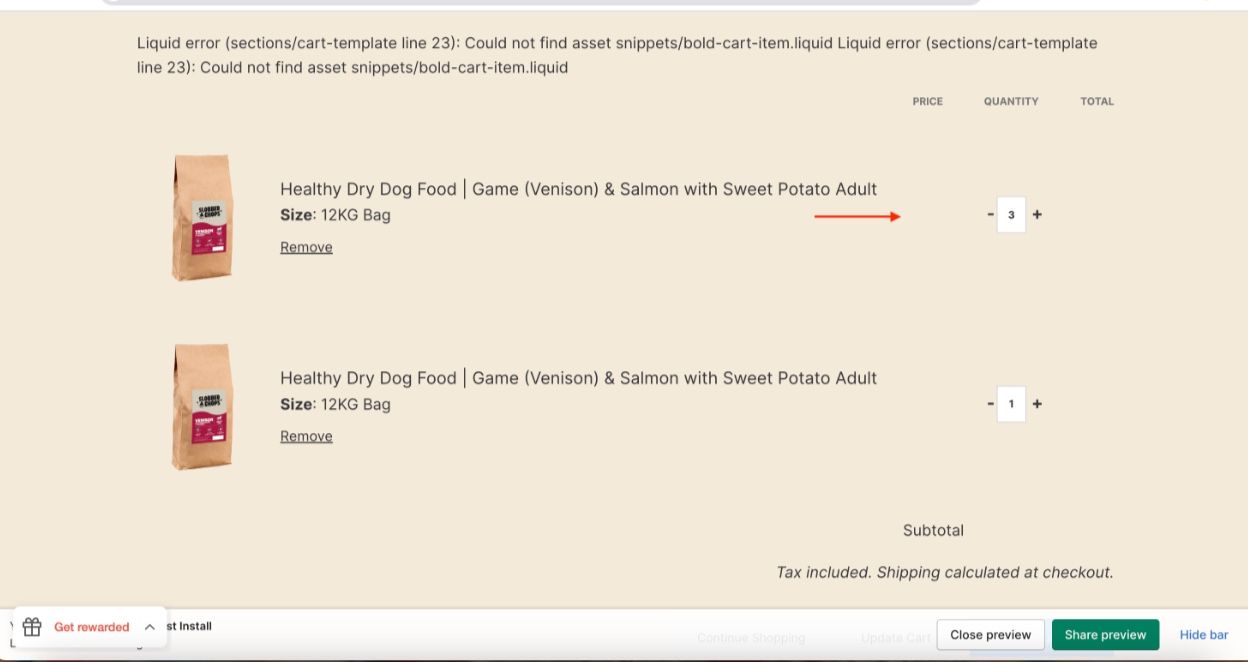
I currently manage my subscriptions through Bold Subscriptions, but due to changes to their services, I am trying to migrate across to Appstle. Unfortunately, when I try to remove the code from the Bold app that has been installed on my website, it is causing error messages to appear on my site because the code is significantly impacting my cart page. As shown in the attached screenshot, the prices on the cart page are linked to the Bold variables. When I try to remove the Bold variable, the prices disappear from the cart page.

The website address is www.slobberandchops.com. As mentioned, I am very keen to move away from Bold so need to get the app off my website without breaking other elements. If anybody has a solution to this, I would be most grateful.

Many thanks in advance,

Liam

1 Like

Hi @liambeauchamp ,

Step 1: Go to Shopify Admin → Online Store ->Theme → Edit code

Step 2: Search file theme.liquid

Step 3: Insert this code above tag:


Here is result:

Hope this can help you,

If our suggestions are useful, please let us know by giving it a like or marking it as a solution. Thank you :heart_eyes:

Thank you so much for your quick response. I tried your suggested solution but unfortunately it didn’t work. Just for context, I have removed all code relating to Bold Subscriptions in a test theme and I tried your solution in there. As you will see from the attached screenshot, I am receiving error messages at the top of the page from removing the code and the cart subtotal still isn’t showing. Is this something you could assist with?