Hi my name is Cesar, and my customers have the same problem they all put in the correct information. I am using Shopify payments and every time they put in their info it says Your payment details could not be verified.
1 Like
Hi, @thefittedplug . Thanks for reaching out about this. We definitely need to get to the bottom of this for you!
Have you already confirmed that Shopify Payments is not in test mode? You can determine this by going to ‘Settings > Payments’. If it’s in test mode, you’ll see a yellow banner stating “Shopify Payments is running on test mode” as shown in the screenshot within my reply in this thread on 02-08-2021. The steps to turn it off are also listed there.
If it was not in test mode, then the next thing I recommend checking is if the payment attempts are showing up in your Abandoned Checkouts. You can view them by going to ‘Orders > Abandoned Checkout’. Please scroll down to the History section of the abandoned order, and click on the payment event to see what additional information it gives that may help resolve the issue for your customers. Let me know if you find anything there!
And then lastly, if neither of the above troubleshooting steps help, we’re happy to look further into it with you. We’ll need to access your account in order to do so, and while we’re not able to provide account-specific support via the Shopify Community at this time, we’d be glad to continue assisting you through live chat, email, or callback. Please visit the Shopify Help Center and log in to your account to create a support request.
Since this is the next step I’ve marked this reply as the solution for the benefit of others who may discover this topic. Thanks!
Hi,
I’m facing this same issue while my Payment Test Mode is on. I’m using Stripe as a payment gateway.
Thanks,
Numan Ijaz
Hi, @Numanijaz . Thanks for reaching out about this!
If your payment gateway is in test mode, then it will not be able to process any real payments. You would only be able to process a test payment using specific credit card criteria. If a real transaction is attempted, then an error message such as “Your payment details could not be verified. Check your card details and try again” would appear. Therefore, to be able to process a real payment, you need to turn the test mode off.
Since you’re using a third party gateway, did you turn on test mode via the Bogus gateway? Or have you turned test mode on from directly within your Stripe account?
I have had clients who have had their payment methods declined many times and I have also run a similar test myself and had the same message please help
I’m also using shopify as payment gateway Well as far as I’m concerned I think I am
Please help

Hi, @Waltonfinearts . I’m here to help!
Thanks for providing a screenshot. I can see here that you are currently using the Bogus gateway.

The Bogus gateway is used for testing purposes, and so will only work when entering specific credit card criteria. Please see the Help Doc for Place a test order by simulating a transaction for more information about this, including how to deactivate it.
Once it’s deactivated, you’ll need to activate a payment gateway so that your customers can purchase from your store. Therefore, if you are planning to use Shopify Payments, you can enable it by referring to the steps in the Help Doc Set up Shopify Payments.
Let me know how it goes!
I am also having this same issue. Can you please help me troubleshoot. Attached is a screenshot of the order inside abandoned carts.

Hi Helen, I am experiencing the same issue as mentioned above. I’ve followed your directions and can confirm that although the security code is correct even though it’s being flagged otherwise. We are using Shopify Payments. I’ve attached a screenshot for your reference. Thanks in advance for your guidance!
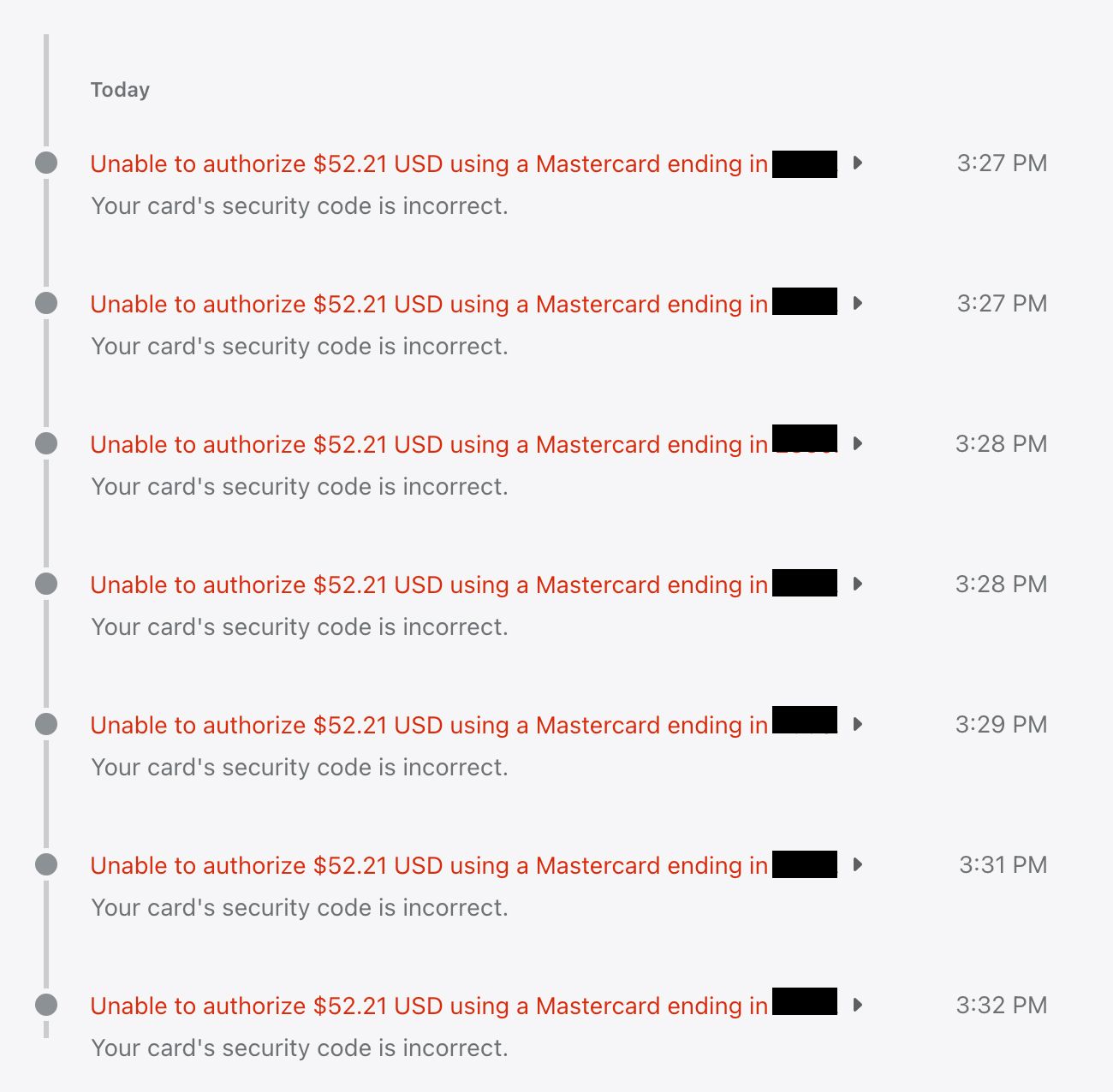
Hello Helen,
A client received the same error message last week (“Your payment details couldn’t be verified. Check your card details and try again.”), however, I do not see the order details in Abandoned Checkouts.
I am using Shopify payments. Please advise!
Hi there, I am having a similar issue. I just ordered a product on Fk.Toys, a shopify powered website, and I entered my details correctly. It said “your payment couldn’t be verified please check details” but this is obviously false because the 68.99 was immediately removed from my account under the name of the website I was on. I want to know: should I wait and see if this thing is delivered? Should I reenter the details? Will I get this product if it is saying the product has unverified payment? I am extremely hesitant to do this twice since it may just steal my money and ask for details to be clarified again. Anyone have experience with this?

This is happening when I try to order from omocat which uses shopify and I have no idea what to do, I think I’m going to lose the chance to get the item I was trying to get. The strangest part is that it charged me anyways. 
We are also having the same problem. We use Shopify Payments.
The customer has said:
The error message I got:

I put in my credit card data (it’s a Master Card), accepted the order in my credit card app, was redirected again to the payment site, there it said that my order was being processed and after that, I got the message above.
I cannot see an abandoned checkout for this.
Please can you confirm why this be the case.
Many thanks
Hi Helen, I’m having the same issue, and I’m using Shopify Payments. What should I do?
Hey, @AlexElysian
Did you go through the troubleshooting steps that Helen laid out in her post here? If you have gone through your abandoned checkouts and are unable to find a cause, it looks like we’ll need to access your account in order to resolve this issue.
While we’re not able to provide account-specific support via Community at this time, we’d be happy to continue assisting you through our available support channels. Please visit our help center and login for assistance.
Hi, I have the same problem My customers put the card data correct but it says that they need to check their details and try again, one of them said that it worked with the apple pay. I m using shopify payments. Can you please help me ?