How can I enable second image hover on mobile product cards?

Hi! I want the product cards to show their second image on hover, I have checked the option and it works on desktop, but it doesn’t work on mobile… I need it to work on mobile too. Any help please?

Here’s the store https://agori-jewellery.com/

I’m using Dawn 7.0.1

Hi @agori ,

Glad to support you today.

To can show second image on Mobile, you can check out my suggestion below to make it:

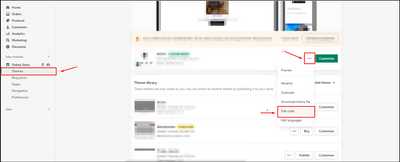
  1. Go to Edit code on Online Store:

  1. add my code above the tag on Theme.liquid:

I hope you find the answer helpful.

Kind & Best regards,
GemPages Support Team.

I tried it like this, but still doesn’t work

Hi @agori

May I suggest to update code these steps:

  1. Go to Store Online-> theme → edit code
  2. Assets/component-card.css
  3. Add code below to bottom of file
.card-wrapper:hover .media.media--hover-effect>img:first-child:not(:only-child) {
    opacity: 0;
}
.card-wrapper:hover .media.media--hover-effect>img+img {
	opacity: 1;
    transition: transform var(--duration-long) ease;
    transform: scale(1.03);
}

yep! It worked!! Thank you so much!

Hi I’ve tried this one. However, it didn’t work for me :disappointed_face:

Hello. In the edit code i cannot find this “Assets/component-card.css”

Do you have another solution for this?

I have used this, hover over image now works but when you have stopped touching that image it does not revert back to the first image, it is stuck on the hover image. Any advice?

Hi @DarrenLeslie !

I suggest add more code below

.card-wrapper:not( :hover ) .media.media--hover-effect>img:first-child:not(:only-child) {
    opacity: 1;
}
.card-wrapper:not( :hover ) .media.media--hover-effect>img+img {
	opacity: 0;
    transition: transform var(--duration-long) ease;
    transform: scale(1);
}

Hi,

As I mentioned you before I cannot find “Assets/component-card.css”

I use theme called Flex by Out of the Sandbox.

Could you please help me out as well?

Thanks,

Hi @eneskbm ,

You can add code below to layout/theme.liquid file before tag.


You can refer the screenshot below:

Hi @EBOOST ,

Thank you for your reply. Unfortunately, it didn’t work :disappointed_face:

By the way, I use Flex Theme 3.0.0 by Out of the Sandbox.

Hi @eneskbm ,

With your theme. We can’t use this code.

You can follow screenshot below to update code.

  1. Go to Assets/utilities.js

  2. Find showVariantImage function

  3. Update ‘mouseenter’ to ‘mouseover’ and ‘mouseleave’ to ‘mouseout’

Hi again,

I much appreciate your effort again but it didn’t work either :disappointed_face:

As you can see I applied exactly what you asked me. I really don’t get it why it’s not working at all :disappointed_face:

Hi,

Sorry. I missed a screenshot.

Hi again,

First of all, thanks a bunch that you’ve been trying to help me.

It partly worked. That’s a big step to be honest. You can check by entering our website on mobile to see the way it works. You need to push the image little bit hardly not just hovering so that you can see the second image.

What I want it’s to be worked: you can refer to Messika’s website on mobile in the link below to see the difference between ours and theirs. It would be amazing if we can set it up and works such way. You don’t need to push just hover and browse around the image and it switchs to the 2nd image immediately in Messika website. Hope you understand me.
https://www.messika.com/en/jewelry/categories/diamond-ring

Hope we can revise and fix it :slightly_smiling_face:

Cheers,

Hi again @EBOOST ,

Looking forward to hearing from you :disappointed_face:

Hi @eneskbm ,

You


try to add code below to layout/theme.liquid and before tag

Yess!!! It worked perfectly!!

Thank you sooo much. I really appreciate it!!

Best,

Hi,

does anyone know how to do this on impulse theme? Hover works on desk but not on mobile. Thank you.