Hello
I’m adding Policies to my new Shop but the font size of the normal Page and a Policy page is different and i would like to get the header of a policy page the same size as a normal page how is this possible?
Thanks already
Main issue: The page title (header) size on policy pages in a Shopify store differs from normal content pages; the goal is to make policy page titles match normal page titles (including top margin). Theme: Dawn (Shopify’s free theme).
Initial guidance: Suggested checking theme settings for text size, but this did not address the header discrepancy. Viewing the store was requested; a tangential comment about products caused frustration.
Technical attempts:
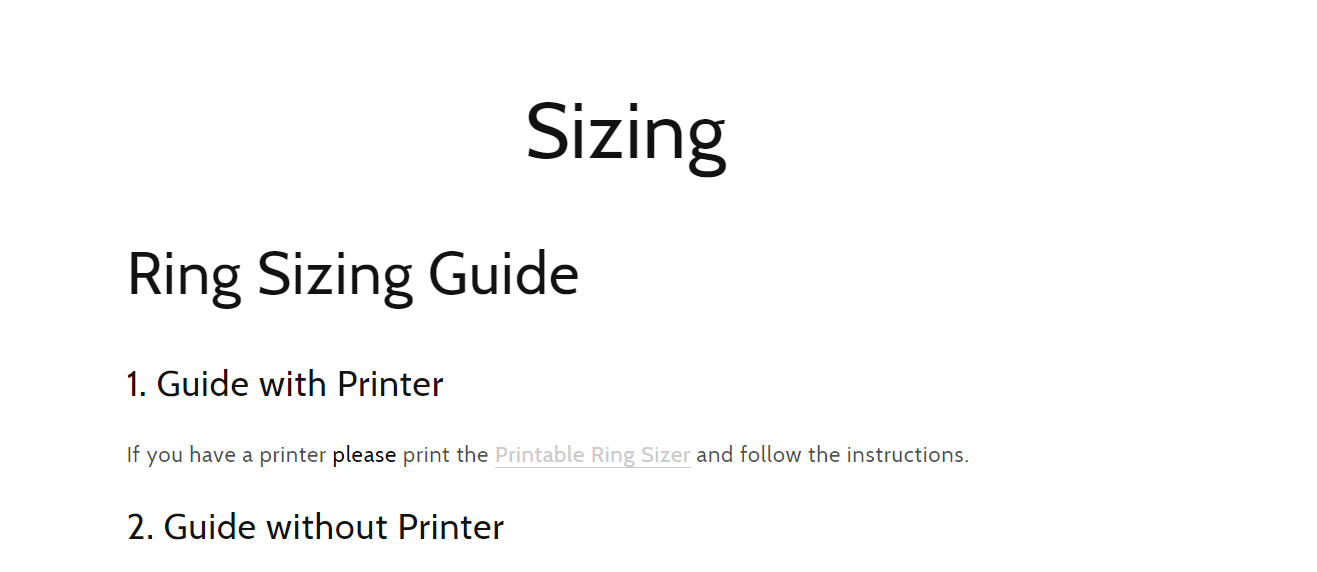
.shopify-policy__body .rte p { font-size: 18px !important; } (affected paragraphs only, not titles)..rte h1 { font-size: 34px !important; } (made subtitles uniform, still not fixing page title vs policy title mismatch).Clarification: Screenshots were provided showing normal page (“Sizing”) having a larger title than the largest subtitle, while policy pages (e.g., “Warranty and Returns”) had titles the same size as subtitles. Images are central to understanding the visual difference.
Latest update (proposed fix): CSS targeting the policy title element:
.shopify-policy__title h1 { font-size: calc(var(--font-heading-scale) * 5.2rem) !important; margin-top: 80px !important; }--font-heading-scale variable and !important to override theme styles.Status: A concrete code solution was provided; confirmation of success is pending. Action: Paste the CSS at the top of base.css.
Hello
I’m adding Policies to my new Shop but the font size of the normal Page and a Policy page is different and i would like to get the header of a policy page the same size as a normal page how is this possible?
Thanks already
@Notschger it is possible but mostly depends on the type of theme you are using
@Santos_miles Sorry i forget to mention i am using the Dawn theme.
@Notschger okay… you can just go to the theme settings, and see some features there about changing text size or so.. and if it can’t it might be because its a free theme
can i view your store
sure its https://customicezurich.com/ with the password notschger
@Santos_miles could you tell me how to do it?
@Notschger go to the theme settings in the design page and you will some categories there, but your store is empty, there is no products
I don’t think you know how to solve my problem but thank you. It has nothing to do with products in my store.
Hii, @Notschger
Paste this code on top of the base.css file.
.shopify-policy__body .rte p {
font-size: 18px !important;
}
Thank You.
@Zworthkey This only changes the body font size of the policy page. My porblem is that the header font size of a normal page and a policy page are different and i would like to have the header in the size of a normal page so the policy page looks like a normal page.
Thanks already
@Zworthkey could you help me with that?
hii, @Notschger
Can you give me a screenshot of your problem so,
I can solve it pefectly.
Thank You.
@Zworthkey sure so check the pictures. On my sizing page the title is bigger than the the biggest subtitle. on my policy pages it is the same size check for example warranty and returns. i would like to have the policy page title the same size like a normal page.
hii, @Notschger
Paste this code on top of the base.css file.
.rte h1 {
    font-size: 34px !important;
}
Thank You.
@Zworthkey Now just the subtitles are all the same size. But I need the “Warranty and Returns” and “Sizing” the same size and preferably also with the same margin from the top.
@Notschger
Paste this code on the top of the base.css file.
.shopify-policy__title h1 {
    font-size: calc(var(--font-heading-scale) * 5.2rem) !important;
    margin-top: 80px !important;
}
Thank You.