My website is built with WordPress software, I want to change Shopify, but my products are special, they are all custom-made, for example: https://www.starprint.com.au/custom-printed-tablecloths/, Is there any good APP that allows me to set multiple customization options?
Topic summary
A user is migrating from WordPress to Shopify and needs an app to handle custom product options for made-to-order items like custom-printed tablecloths with uploaded logos.
Multiple app developers have recommended their solutions, all offering similar core features:
Common capabilities across recommended apps:
- File upload functionality for customer logos/images
- Multiple option types (dropdowns, swatches, radio buttons, checkboxes)
- Live preview/real-time visualization of customizations
- Dynamic pricing for add-ons
- No coding required
- Production-ready file generation
Apps specifically mentioned:
- Nala Custom Options
- Easify Product Options (with detailed setup screenshots)
- Kickflip
- Inkybay - Product Personalizer
- Teeinblue (includes CSV export for fulfillment)
- Customify, Customized, Product Customizer, Tepo Custom Product Options, PitchPrint, and others
Several responses include visual examples and configuration screenshots demonstrating how tablecloth customization would work. The discussion remains open with no clear resolution on which app the original poster selected.
1 Like
you can use this https://apps.shopify.com/nala-customoptions?surface_intra_position=3&surface_type=partners&surface_version=redesign
Hi @Kayaplant
I think the Easify Product Options app will be a great fit for your move from WordPress to Shopify—especially since your products are custom-made like tablecloths with logos. The app lets you add powerful customization features like file upload (for customers to upload their logo), and many other option types such as image swatches, buttons, radio buttons, and dropdowns—all without any coding.
It also supports a live preview, so your customers can instantly see how their logo will look on the tablecloth before adding it to cart. It’s super beginner-friendly and ideal for personalized product stores. Here’s how it works:
- This is the result:

- This is the app setting:

You can set add-on price for each tablecloth here:

Next, create a file upload option. If you want to show customers’ logo in real-time, simply select the “Enable Live Preview” in the Product Personalizer of that file upload option.

I think this app will be a smooth solution for you—it’s beginner-friendly. Feel free to reach out to Easify if you have any questions. 
Hi @Kayaplant !
Kickflip is exactly what you’re looking for.
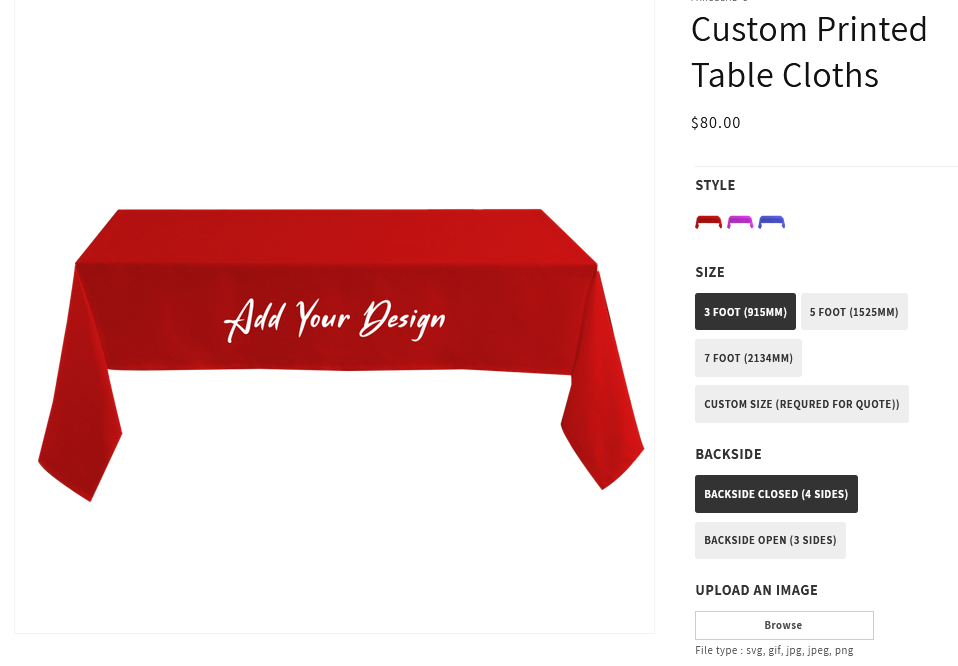
It lets you sell customizable products directly through your online store while giving your customers a live preview of their final design before placing an order. They’ll be able to choose their preferred style, size, backside, upload their own image, and see the result in real time!
It’s incredibly easy to build your products with Kickflip, it integrates seamlessly with Shopify, and it offers a smooth, user-friendly customization experience for your customers.
I encourage you to give it a try—you’re going to love how effortless it is!
1 Like
Hi @Kayaplant
Since you’re moving from WordPress to Shopify and want to offer custom-made products like printed tablecloths, Inkybay - Product Personalizer can help you achieve the same level of product customization on your new Shopify store.
With Inkybay’s product option features, you can add swatches, file uploads, drop-downs, radio buttons, checkboxes, etc. It also includes dynamic pricing and conditional logic to create a smooth, interactive customization process for your customers, no coding required.
You will get all the selected option details in the order file. If you want, we can share a demo product with you.
Thank you.
Hi @Kayaplant,
Teeinblue can assist your migration to Shopify with extensive customization options for complex products like custom tablecloths. You can:
-
Add a button for customers to upload their own images or logos
-
Add an add-on charge per option
-
Enable customers to see updates in a real-time preview
-
Receive production-ready files that are high-resolution and auto-generated
-
Export order details in CSV for quick fulfillment
The process to publish a personalized product is simple:
-
Create your design and incorporate options
-
Connect that design with your tablecloth
Here is a quick demo reflecting your product:

Highly recommend that you give it a try!
Hi @Kayaplant
If you’re transitioning from WordPress to Shopify and need to offer robust customization options for your custom-made products—like your custom-printed tablecloths—there are several Shopify apps designed to meet these needs. Here are some top recommendations:
- Customify – Custom Product App
This app offers a user-friendly interface that allows customers to personalize products with text, images, and more. It’s ideal for custom-made items like your tablecloths. - Customized – Print Automation
Provides 3D and AR previews, enabling customers to visualize their customizations in real-time. It’s excellent for products requiring detailed design input. - Product Customizer
Supports unlimited variants and customization options, including text fields, file uploads, and swatches. It’s suitable for offering a wide range of customization choices. - Tepo Custom Product Options
Allows for bulk option management and integrates custom options across orders, emails, and invoices, streamlining the customization process. - PitchPrint – Web-to-Print
Offers advanced customization features, including templates and dynamic previews, catering to businesses with complex customization needs. - Teeinblue – Print-on-Demand Personalizer
Tailored for print-on-demand businesses, it supports text, image, and file uploads, with instant mockup generation, simplifying the customization process.
Thanks