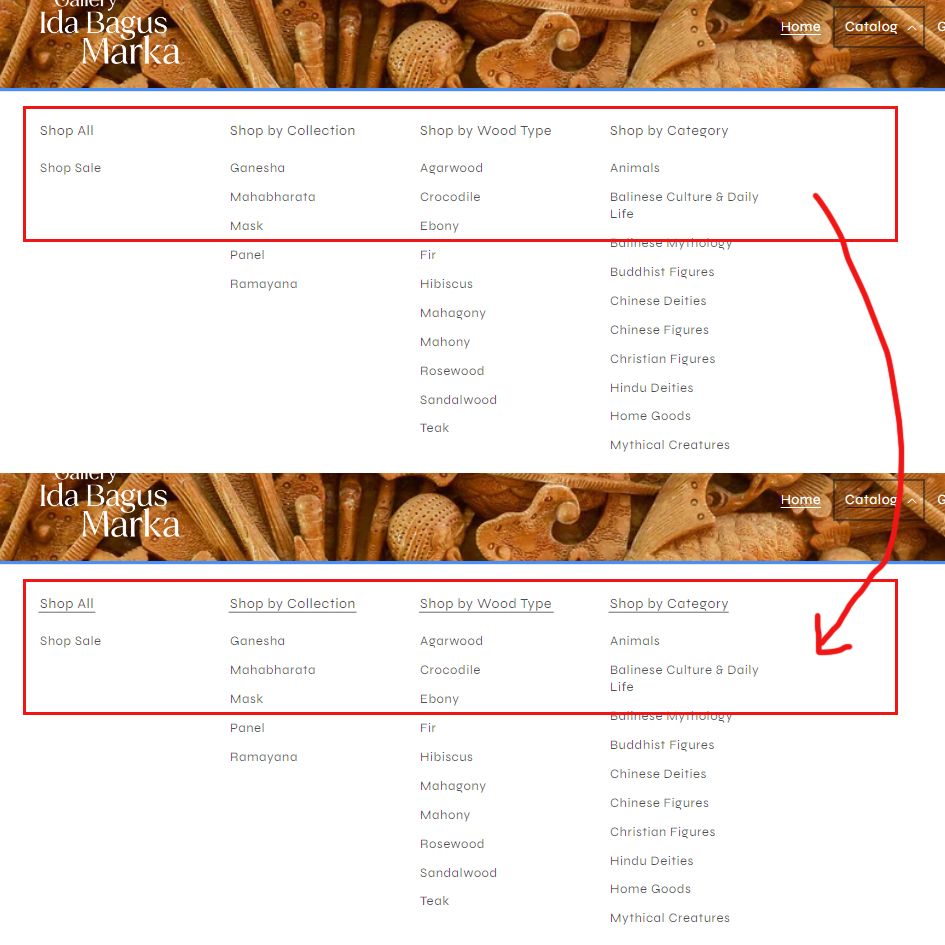
Hi Shopify Community!
Was wondering if there is a way to add underline to the submenu heading in the desktop megamenu in Dawn theme. But only to the second submenu. I’ve attached a picture to illustrate what I mean.
My store is galleryibmarka.com and password is skiegi
Hopefully someone can help me. Thank you in advance 
Hi @markaib
I’m Richard Nguyen from PageFly- Free Landing Page Builder
You can try with this code.
Follow this:
Go to Online Store->Theme->Edit code->base.css->paste bellow code in bottom of file
.mega-menu__link–level-2:not(:only-child) {
text-decoration: underline;
}
Hope that my solution works for you.
Best regards,
Richard | PageFly
1 Like
Hello @markaib !
Hope you are doing well.
Please add the below CSS code to your base.css theme file at the bottom to add the underline in the submenu:
a.mega-menu__link.mega-menu__link--level-2.link {
    text-decoration: underline !important;
}
Hope this helps.
1 Like
Hello @rutvik_shop and @PageFly-Richard , thank you for replying with a solution. Both code works, however it didn’t work when added to base.css, but works perfectly well when added to the bottom of component-mega-menu.css. Thanks for helping!
How do I add the megamenu option to my Dawn theme to begin with??