Adding Color Swatches to Debut theme instead of Dropdown

I recently created my Shopify store using Debut theme, but i faced one issue when i checked how my customer chooses his/her product. So the problem is that when the customer enters the product page they see photos of the product,that they can select, and a little dropdown that actually selects the variant that he/she wants to add to cart. The issue is that my product has a lot of variants and they may get confused by which name to which photo belongs so i thought that it would be great if i could add color swatches so that they can navigate and checkout easier. I would be pleased if someone could help me with this.

Thanks in advance!

@JordanM

Follow instruction as per the document http://docs.minionmade.com/shopify/add-color-swatches-to-products-in-shopify

If you are not comfortable to do it then you can send me direct mail, I will help you to do it from my side.

Thank you,

Tejas

Hello Tejos_Naptada,

thank you for sharing the swatch tutorial. I managed to add the swatch.liquid snippet but i don’t know where to paste the following code:

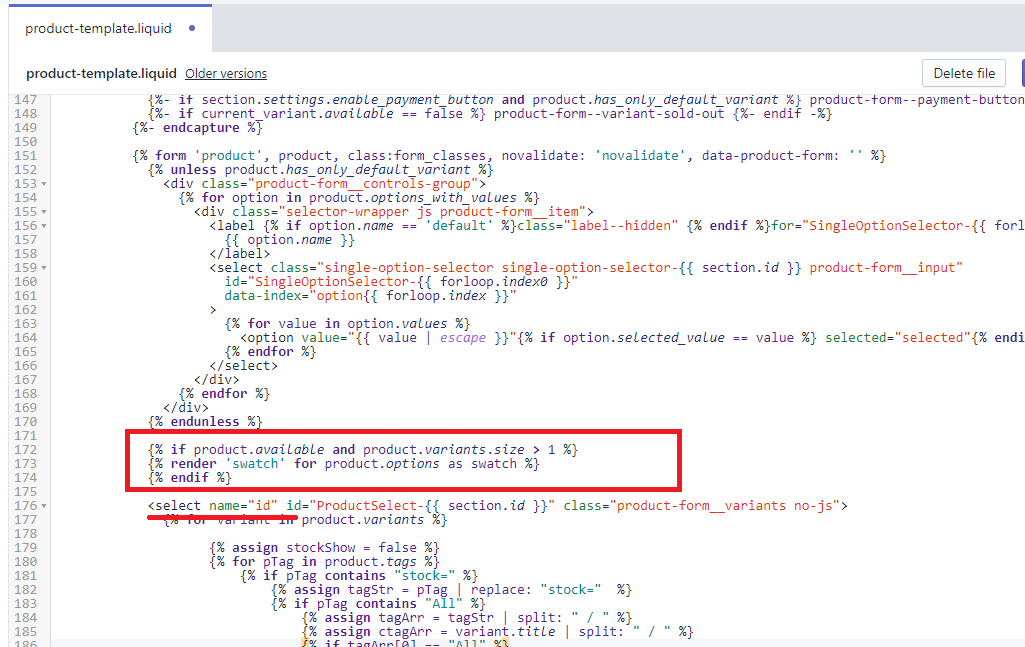
{% if product.available and product.variants.size > 1 %}
{% render 'swatch' for product.options as swatch %}
{% endif %}

That is my product.liquid template:

{% comment %}
  The contents of the product.liquid template can be found in /sections/product-template.liquid
{% endcomment %}

{% section 'product-template' %}
{% section 'product-recommendations' %}

{% if collection %}
  
    
      {% include 'icon-arrow-left' %}
      {{ 'products.product.back_to_collection' | t: title: collection.title }}


{% endif %}

{% assign current_variant = product.selected_or_first_available_variant %}


Also i can’t manage to find the selectCallback function. Should i create it and how?

@JordanM

Go to the product-template.liquid file and paste the code like following:

Let me know if you have still any confusion.

Thank you,

Tejas

Hello,

thank you for your assistance. It seems like i was looking in product.liquid not in product-template.liquid. I managed to place the code. I will now continue with the tutorial and hopefully will finish it without other issues

Hello,

I managed to add the swatches to my store. They now appear. But there are two problems:

  1. The old selectors for color and size still appear.

  2. When i click the swatches they don’t select the color/size. The only way to select color/size is with the old selectors

@JordanM

Send me your store URL, I will send you request for the Shopify collaborate account so I can access the theme code and fix the issue from my side.

Thank you,

Tejas

Hi can i send you my store url and password so that you can access the code with inspect element and tell me what to change?

Thank you in advance!

@JordanM

It requires to check in code file, difficult to tell you directly with inspect element.

Thank you,

Tejas

Alright , would you send me a request?

Hi,

were you able to get it through? I am also stuck. Variant are not changing Whatso ever i do

No man.I am struggling as well. As far as I know I need to bind the buttons
so that they do what they are supposed to do with JavaScript. Did you
manage to remove the color and size selectors though?

Still Stuck

I hope that someone comes up with a solution for the problem, because it’s
essential for conversions and will finally give the answer to this problem.
The tutorial seems outdated to me.A lot of things have changed

@JordanM

I sent request for the Shopify collaborate account, accept it so I can fix the issue.

Thank you,

Tejas

@JordanM

Thanks for accepting the request. I fixed the issue from your theme.

Cheers,

Tejas

Hey Tejas,

You had been at least a theme savour for sure. What were the fixes that were done. Also prices are getting updated with the variants?

@JamalAslam

Yes, Also price are getting updated with variants.

If you are still facing any issue then send me an email with your store URL.

Thank you,

Tejas

Let me get my partner on it and i will send you the email

Hey there, I am having the same issue. Swatches appear along with the old selectors and when selecting the swatches both the picture of the variant doesnt come up and what is added to the cart is actual what is in the dropdown selector (not what is selected on the swatch). Could you provide guidance on what you did to fix this or help me as well>