Hello,
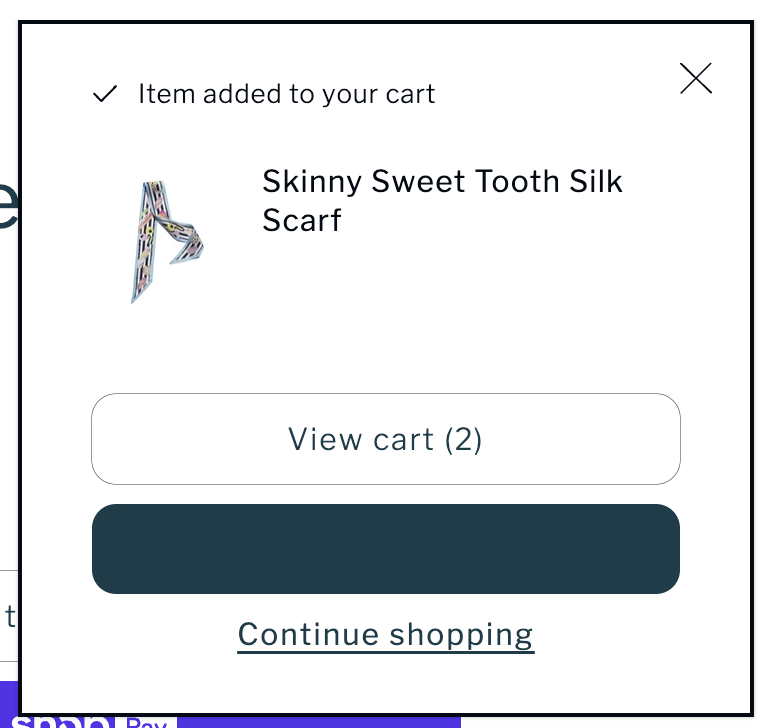
Can anyone advise where I edit the colour for the button (in the image that is dark green) as currently you can’t see the text for this button?
The button appears in a pop up when something is added to cart.
Thank you.
Hi @Corinne33
pls share the store url & password (if applicable) then I will check & give you the solution
@Corinne33 hey, thanks for posting here.
can you please share the link to inspect it, thanks.
Hello @Corinne33
Go to online store ----> themes ----> actions ----> edit code ----> assets ----> base.aio.min.css
add this code at the end of the file and save.
.button.button--primary.button--full-width {
color: white !important;
}
result
If this was helpful, hit the like button and accept the solution.
Thanks
Hi @Corinne33 ,
To change the text color of the checkout button. You need to add the below-mentioned code in base.aio.min.css at the very bottom
button.button.button--primary.button--full-width {
    color: #fff;
}
If that works for you. Don’t forget to like and accept the solution
Thanks!
Hi Corinne33
How to Edit the Button Color in the Cart Pop Up
Go to your Shopify Admin
Click on Online Store > Themes.
Find your active theme
Click Customize on your current theme
Look for the Cart or Pop Up Settings
Inside the theme editor check if there’s a section called Cart Cart Drawer or Pop up settings
Many themes allow you to directly edit button colors in these sections without touching code.
If you can’t find it easily
Click on Theme Settings usually at the bottom left corner
Go to Colors.
Look for Button colors sometimes called Primary Button or Cart Button and adjust both the button background color and the text color
If the Theme Doesn’t Have an Option Manual way
Go back to Online Store > Themes > Actions > Edit code
Open the file called base.css theme.css or sometimes component cart.css depends on your theme
Add this at the bottom
css
Copy
Edit
cart-popup .btn
background color #yourcolorcode * Example #ffffff for white *
color #yourtextcolorcode * Example #000000 for black *
Replace #yourcolorcode and #yourtextcolorcode with the colors you want you can use a color picker like color.adobe.com if you need help choosing
Save, then refresh your store and test it
Thank you
Happy to help-you…!!!