Hi all,
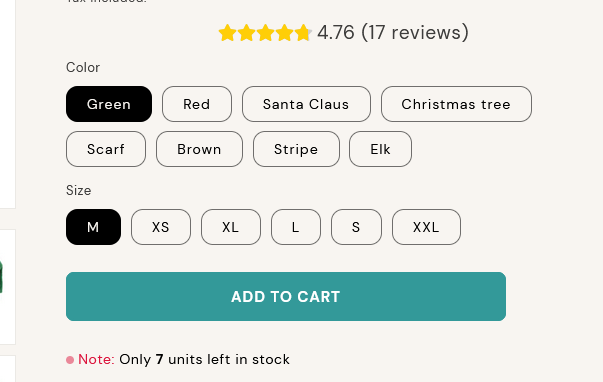
I have 2 questions in regards to the ADD TO CART button.
- Is it possible to reduce the length of the button?
- How do I make the button text center-aligned?
Thank you for your help!!
Page: wooffantasy.com
Hi all,
I have 2 questions in regards to the ADD TO CART button.
Thank you for your help!!
Page: wooffantasy.com
Hey @sunday_april
Follow these Steps:
Go to Online Store
Edit Code
Find theme.liquid file
Add the following code in the bottom of the file above tag
RESULT:
If I managed to help you then, don’t forget to Like it and Mark it as Solution!
Best Regards,
Moeed
You can use this code here:
.product-form__buttons button.product-form__submit {
    max-width: 30rem !important;
    justify-content: center !important;
}
You can add in custom CSS field:
Hope this can help!
Best,
Daisy
Hello @sunday_april
Go to online store ----> themes ----> actions ----> edit code ---->base.css
add this code at the end of the file and save.
.product__info-container * {
justify-content: center !important;
}
result
If this was helpful, hit the like button and accept the solution.
Thanks
Hello, @sunday_april try this code
.product-form__buttons .product-form__submit {
    justify-content: center !important;
    max-width: 300px;
}