The variant on the product page has been hidden. Is it about the Theme i use? Shopify support told the code has been edited so the variant can’t be displayed. Here is the URL. Would anyone please help? Thank you so much!
Buy French Food Online UK | Care About What You Cook (gourmetdeparis.co.uk).
1 Like
Hello @Daniel1010101
Go to online store ---------> themes ---------> actions ------> edit code------->Theme.css ----> line number 5598
and delete this code and save.
.hidden {
position: absolute;
left: -10000px;
top: auto;
width: 1px;
height: 1px;
overflow: hidden;
}
and the result will be
If this was helpful, hit the like button and mark the job as completed.
Thanks
Thank you so much~
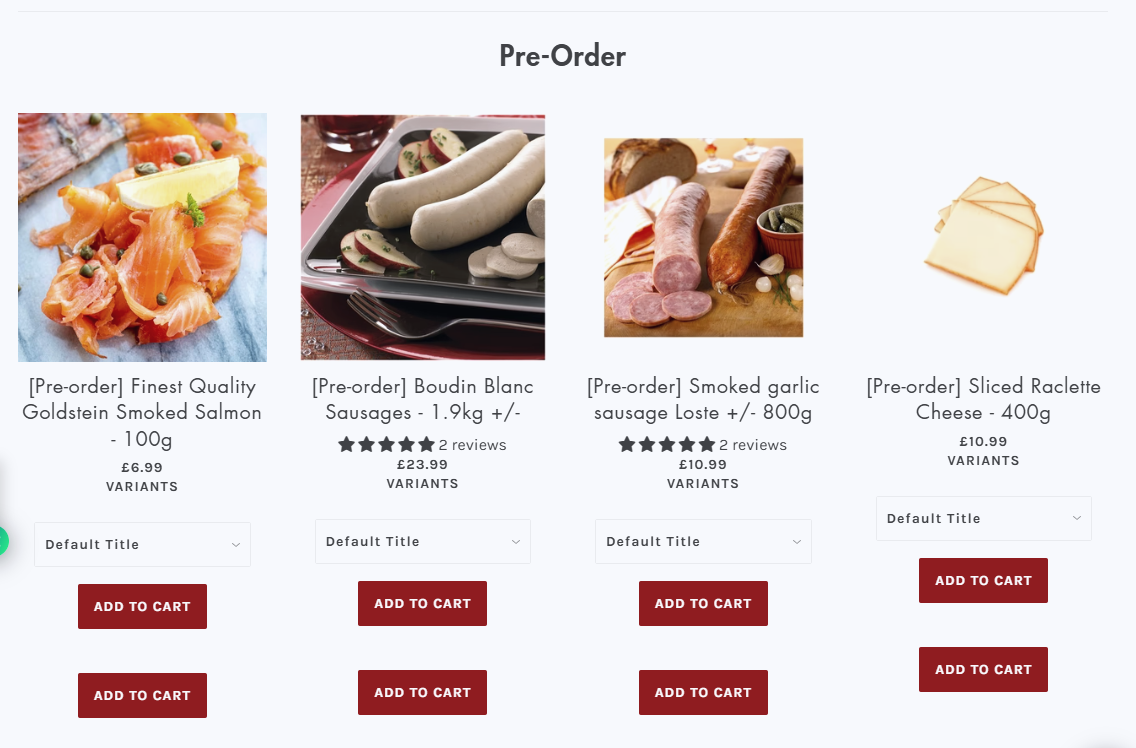
After i deleted it, i couldn’t see the variant in product page but i found the variant (or default title if no variant is created), and one more ADD TO CART button under each product in the category page. Please see attachment. Thanks for the help!
- Here is the solution for you @Daniel1010101
- Please follow these steps:
- Then find the theme.css file.
- Then add the following code at the end of the file and press ‘Save’ to save it.
.hidden {
    width: auto !important;
    height: auto !important;
    left: 0 !important;
    position: relative !important;
display: block !important;
}
- Here is the result you will achieve:
- Please press ‘Like’ and mark it as ‘Solution’ if you find it helpful. Thank you.
Thanks
But still, i found the variant (or default title if no variant is created), and one more ADD TO CART button under each product in the category page. Can the extra Add to cart and Variant be hidden? Please see attachment. Also, in the product page, the variant appears but would like to hide the default title if no variant is created). Thanks for the help!