Hi!
I would like to know how I can change the border color of my quantity selector. I couldn’t find a way to change it into the green color instead of Lilac.
The same thing applies to a button in the “image with text” section (first section on the homepage).
I changed the button color with CSS. However, there is still a Lilac border around the button which I can’t get rid off…
I’m using the Sense theme.
https://nailed-eindhoven.myshopify.com/
Password: NAILED123
Please help me!
Thanks in advance,
Jolie
Hi @StudioJolie
This is Victor from PageFly - Shopify Page Builder App
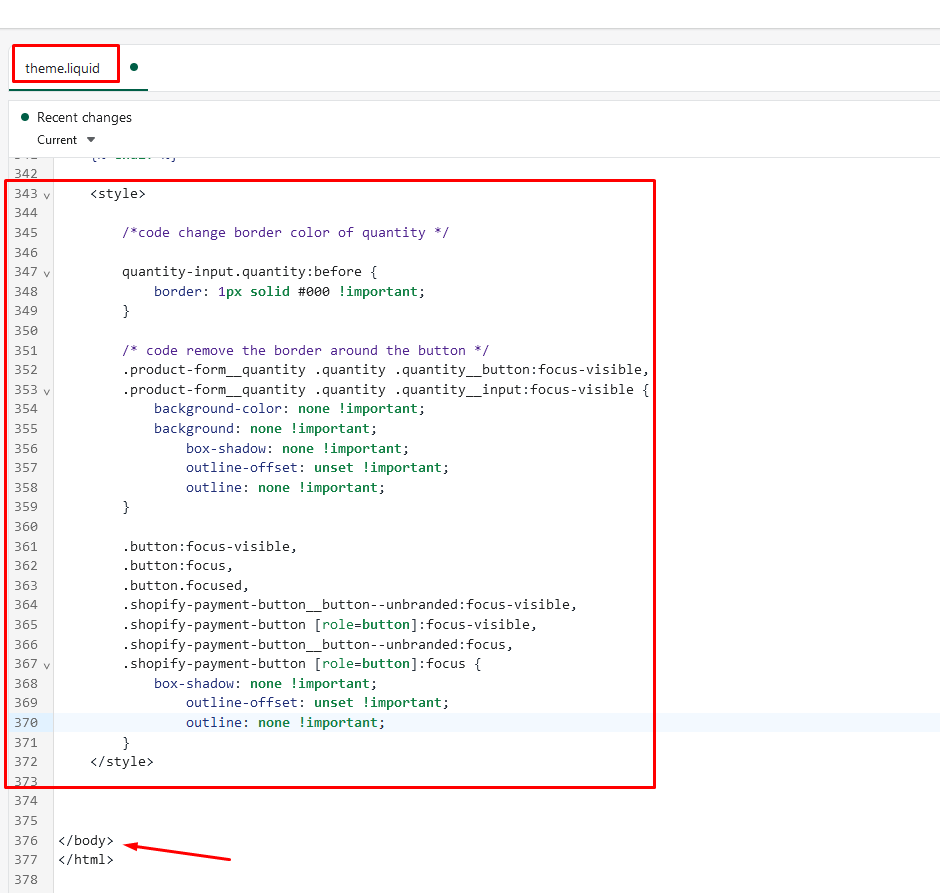
Please add this code to your theme.liquid above the to get this solved
Step 1: Online Stores > Themes > More Actions > Edit code
Step 2: click on theme.liquid and paste the code above the
Hope this can help you solve the issue
Best regards,
Victor | PageFly
Hi @StudioJolie ,
Glad to support you today.
To can change the border color of quantity and remove the border around button, you can check out my suggestion below to make it:
- Go to Edit code on Online Store:
- add my code above the tag on Theme.liquid:
Eg:
*Note: you can replace the hex color code #000 with another color you want.
I hope you find the answer helpful.
Kind & Best regards,
GemPages Support Team.
Unfortunately this doesn’t work for the button on hover. I already fixed the border color of the button and the quantity input selector myself. However, when I hover the button, I still see the Lilac border.
Hi @StudioJolie
You can try to add this code in base.css at the end of the file to remove the Lilac border
button {
position: unset !important;
}
Hope this can help you solve the issue