Hello Everyone,
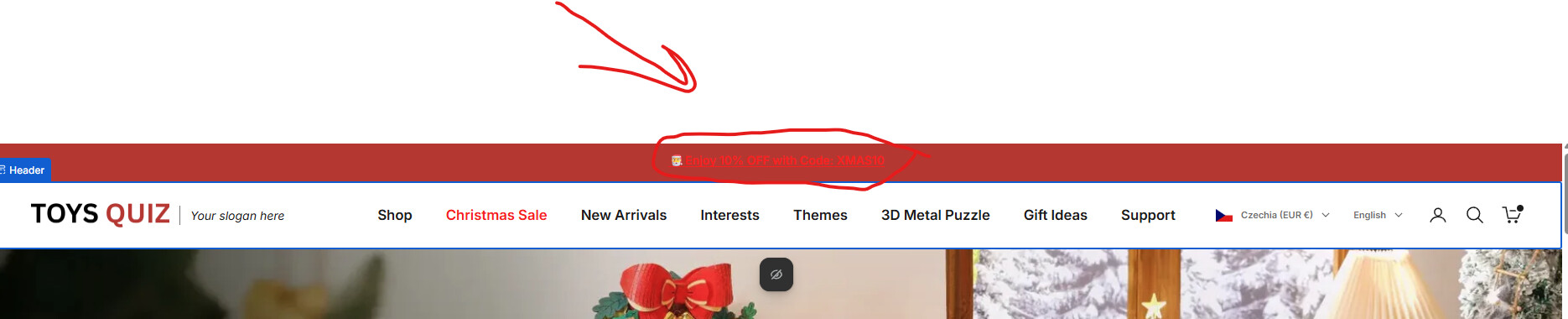
We would like to change the color of the sec top-level menu,
thanks in advance,
url : https://y5r62uwtd30qwt40-87349559639.shopifypreview.com
Request to change the color of only one top‑level menu item (specifically the second item) in the Prestige Shopify theme’s header navigation, without affecting other menu links.
Hello Everyone,
We would like to change the color of the sec top-level menu,
thanks in advance,
url : https://y5r62uwtd30qwt40-87349559639.shopifypreview.com
Hello,
Thank you for reaching out! To change the color of the “Christmas Sale” menu item on your Shopify store, you can add this custom CSS code:
/* Change color of “Christmas Sale” menu item */
.header__menu-item:nth-child(2) a {
  color: #FF0000 !important; /* Replace with your desired color */
}
Once you’ve added this, please send a screenshot of where you are in the progress so I can confirm everything is set up correctly.
If you’re unable to do it yourself, no worries, I’d be happy to assist you and make the change for you.
You can add this code to Custom CSS in theme settings
a[href="/pages/christmas-sale"] { color: red; }
Hi @5611632
You can try this code by following these steps:
Step 1: Go to the online store ->Theme ->Edit Code.
Step 2: Find the theme.liquid file and add the following code before the </head> tag
<style>
a[href="/pages/christmas-sale"] {
  color: red !important;
}
</style>
Results:
Hope this helps! If yes then Please don’t forget hit Like and Mark it as solution!
Please update the code to this.
.header__primary-nav-item a[href="/pages/christmas-sale"] { color: red; }
Thanks so much its working perfect
but when i click on it its back to black until its jump to the page
I cannot see the issue that you mentioned
i fix it and i add another code