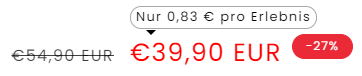
Hello, I have a request, could we change the price, so the strike price no longer first but the normal price first. then the strike price and then the badge with the percentage savings.
that would be great.
thanks in advance for your efforts
ill paste the code from the price.liquid down below. i hope thats the code needed 
{% comment %}
  Renders a list of product's price (regular, sale)

  Accepts:
  - product: {Object} Product Liquid object (optional)
  - use_variant: {Boolean} Renders selected or first variant price instead of overall product pricing (optional)
  - show_badges: {Boolean} Renders 'Sale' and 'Sold Out' tags if the product matches the condition (optional)
  - price_class: {String} Adds a price class to the price element (optional)
  - show_compare_at_price: {Boolean} Renders the compare at price if the product matches the condition (optional)

  Usage:
  {% render 'price', product: product %}
{% endcomment %}
{%- liquid
  if use_variant
    assign target = product.selected_or_first_available_variant
  else
    assign target = product
  endif

  assign compare_at_price = target.compare_at_price
  assign price = target.price | default: 1999
  assign price_min = product.price_min
  assign price_max = product.price_max
  assign available = target.available | default: false
  assign money_price = price | money
  assign money_price_min = price_min | money
  assign money_price_max = price_max | money
  if settings.currency_code_enabled
    assign money_price = price | money_with_currency
    assign money_price_min = price_min | money_with_currency
    assign money_price_max = price_max | money_with_currency
  endif

  if target == product and product.price_varies
    assign money_price = 'products.product.price.from_price_html' | t: price: money_price
  endif
-%}

<div
  class="
    price
    {%- if price_class %} {{ price_class }}{% endif -%}
    {%- if available == false %} price--sold-out{% endif -%}
    {%- if compare_at_price > price and product.quantity_price_breaks_configured? != true %} price--on-sale{% endif -%}
    {%- if compare_at_price > price and product.quantity_price_breaks_configured? %} volume-pricing--sale-badge{% endif -%}
    {%- if product.price_varies == false and product.compare_at_price_varies %} price--no-compare{% endif -%}
    {%- if show_badges %} price--show-badge{% endif -%}
  "
>
  <div class="price__container">
    {%- comment -%}
      Explanation of description list:
        - div.price__regular: Displayed when there are no variants on sale
        - div.price__sale: Displayed when a variant is a sale
    {%- endcomment -%}
      <div class="price__regular">
        {%  if product.metafields.custom.tooltip != blank %}
        <div class="tooltip-price">
          {{  product.metafields.custom.tooltip }}
        </div>
      {%  endif  %}
      {%- if product.quantity_price_breaks_configured? -%}
        {%- if show_compare_at_price and compare_at_price -%}
          {%- unless product.price_varies == false and product.compare_at_price_varies %}
            <span class="visually-hidden visually-hidden--inline">
              {{- 'products.product.price.regular_price' | t -}}
            </span>
            <span>
              <s class="price-item price-item--regular variant-item__old-price">
                {% if settings.currency_code_enabled %}
                  {{ compare_at_price | money_with_currency }}
                {% else %}
                  {{ compare_at_price | money }}
                {% endif %}
              </s>
            </span>
          {%- endunless -%}
        {%- endif -%}
        <span class="visually-hidden visually-hidden--inline">{{ 'products.product.price.regular_price' | t }}</span>
        <span class="price-item price-item--regular">
          {{- 'products.product.volume_pricing.price_range' | t: minimum: money_price_min, maximum: money_price_max -}}
        </span>
      {%- else -%}
        <span class="visually-hidden visually-hidden--inline">{{ 'products.product.price.regular_price' | t }}</span>
        <span class="price-item price-item--regular">
          {{ money_price }}
        </span>
      {%- endif -%}
    </div>
    <div class="price__sale">
      {%- unless product.price_varies == false and product.compare_at_price_varies %}
        <span class="visually-hidden visually-hidden--inline">{{ 'products.product.price.regular_price' | t }}</span>
        <span>
          <s class="price-item price-item--regular">
            {% if settings.currency_code_enabled %}
              {{ compare_at_price | money_with_currency }}
            {% else %}
              {{ compare_at_price | money }}
            {% endif %}
          </s>
        </span>
      {%- endunless -%}
      <span class="visually-hidden visually-hidden--inline">{{ 'products.product.price.sale_price' | t }}</span>
      <span class="price-item price-item--sale price-item--last">
        {%  if product.metafields.custom.tooltip != blank %}
            <div class="tooltip-price">
              {{  product.metafields.custom.tooltip }}
            </div>
          {%  endif  %}
        {{ money_price }}
      </span>
    </div>
    <small class="unit-price caption{% if product.selected_or_first_available_variant.unit_price_measurement == nil %} hidden{% endif %}">
      <span class="visually-hidden">{{ 'products.product.price.unit_price' | t }}</span>
      <span class="price-item price-item--last">
        <span>{{- product.selected_or_first_available_variant.unit_price | money -}}</span>
        <span aria-hidden="true">/</span>
        <span class="visually-hidden"> {{ 'accessibility.unit_price_separator' | t }} </span>
        <span>
          {%- if product.selected_or_first_available_variant.unit_price_measurement.reference_value != 1 -%}
            {{- product.selected_or_first_available_variant.unit_price_measurement.reference_value -}}
          {%- endif -%}
          {{ product.selected_or_first_available_variant.unit_price_measurement.reference_unit }}
        </span>
      </span>
    </small>
  </div>
  {%- if show_badges -%}
    <span class="badge price__badge-sale color-{{ settings.sale_badge_color_scheme }}">
      -{{ compare_at_price | minus: price | times: 100 | divided_by: compare_at_price }}%
    </span>

    <span class="badge price__badge-sold-out color-{{ settings.sold_out_badge_color_scheme }}">
      {{ 'products.product.sold_out' | t }}
    </span>
  {%- endif -%}
</div>

