I want to change Black text to White just on this particular element which has a Pink background.
Shrine Theme - https://c92cd8-82.myshopify.com/products/thaqil
See attached for area in question.
Thanks so much!
I want to change Black text to White just on this particular element which has a Pink background.
Shrine Theme - https://c92cd8-82.myshopify.com/products/thaqil
See attached for area in question.
Thanks so much!
Hi @AAABARTON1
I tried to check this, but it’s not allowed to inspect an element on this site, so it is difficult to find the solution.
Do you have a solution for this?
Regards,
Vinh
Hi @AAABARTON1 ,
You can change the color of elements using the custom CSS field on your “section” in the “customize”.
Go to Online store → Themes → click on the “Customize” button.
In the Customize, change the template to the template of the default product (inside the product option) from choosing from the dropdown. (or the template of your product if you are using a custom template)
After loading the template, click on the section you want to bring up the change.
Go the bottom of the customize option and you’ll find a field “Custom CSS”
.icons-with-text__icon__text, .icons-with-text__icon__text h3
  {
   color: white !important;
  }
If you need further assistance, feel free to reach out! I hope this helps! If it does, please like it and mark it as a solution!
Regards,
Sweans
Hi @Sweans
Your solution looks great.
By the way, could you please let me know how you could inspect the element?
On my side, even right-clicking doesn’t work.
Thanks in advance.
Regards,
Vinh
Hi @vinh0225 ,
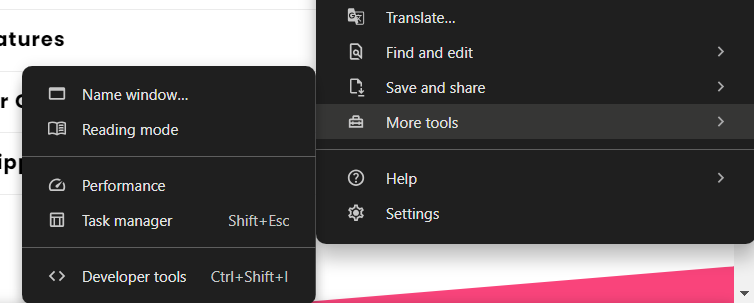
It doesn’t allow us to inspect directly. So, to inspect you can try opening the “Developer tools” from the browser. If you’re using “Chrome”, click on the three dots at the top right corner and a menu appears.
In that menu, choose the “More tools” option and in the sub-menu, choose “Developer tools”. This way you can inspect the webpage
If you need further assistance, feel free to reach out! I hope this helps! If it does, please like it and mark it as a solution!
Regards,
Sweans
you can inspect element on chrome by going to the the three dots top right corner - hover on ‘more tools’ - developer tools
does this work?
Thanks so much, this worked perfectly!