Continue Shopping Button Redirect to Product Page Instead of Collection Page

Topic summary

A user with a single-product Shopify store needs to redirect the “Continue Shopping” button from the empty cart page to their product page instead of the default collections page.

Current Issue:

  • The Dawn theme uses {{ routes.all_products_collection_url }} for the continue shopping link
  • User attempted to replace this with their product page URL but encountered a “Liquid syntax error (line 34): Unexpected character” message

Proposed Solution:

  • Replace {{ routes.all_products_collection_url }} with the actual product page link
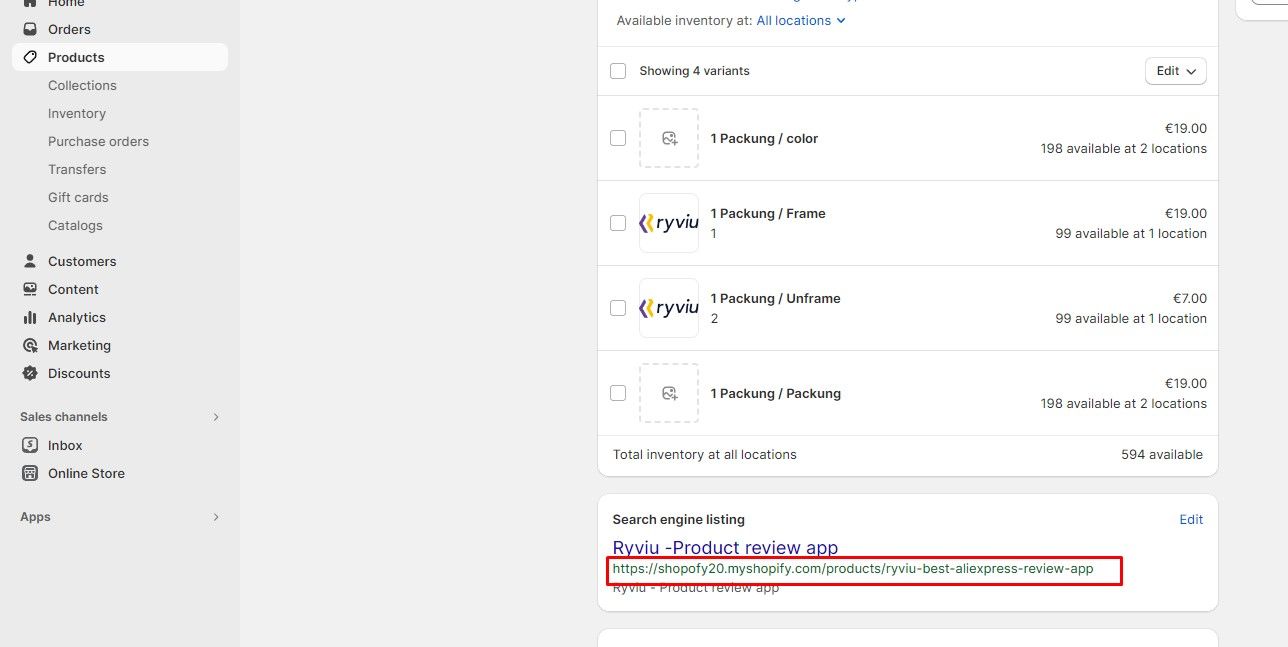
  • To find the correct product page URL: navigate to the product in Shopify admin → Search engine listing section → copy the displayed URL

Status: The discussion provides a clear solution path, though implementation success hasn’t been confirmed. An image reference was shared showing where to locate the product URL in Shopify admin.

Summarized with AI on November 15. AI used: claude-sonnet-4-5-20250929.

Hi there,

Please could somebody help me redirect my ‘continue shopping page’ to the product page instead of the collections page. I have a single product store.

See the Dawn theme code below for an empty cart:

{{ 'sections.cart.title' | t }}

{{ 'general.continue_shopping' | t }}

{{ 'sections.cart.empty' | t }}

{{ 'general.continue_shopping' | t }}

Do I just need the correct url instead of routes.all_products_collection_url?

Thank you so much!
Hi @bolt23

If your store has only one product then you can replace {{ routes.all_products_collection_url }} code with your product page link.

Hi,

I am not sure what my product page link is. When I use what is in my search bar I get the following error.

Liquid syntax error (line 34): Unexpected character

Thanks

Hi @bolt23

When editing your product in your shopify admin, go to Search engine listing then you can see your product page URL