Hi there, what is the custom code to hide the “add to cart button” for a specific product in my shop after a tag a customer and where do I add it. I will tag the customer “sample claimed”. For context, I am offering free samples, but I am wanting to limit it to one per customer/account. The product is “Sample” and for both bag types. Thank you in advance.
Topic summary
Goal: Hide the “Add to cart” button for a specific product once a customer has been tagged “sample claimed,” limiting free samples to one per customer/account.
Details:
- Product: “Sample,” covering both bag types (likely variants).
- Trigger/condition: Customer receives the tag “sample claimed,” after which the button should be hidden for that product.
- Ask: Request for the exact custom code (CSS or other) and guidance on where to place it.
- Context: Offering free samples; needs an enforcement mechanism to prevent multiple claims.
Notes:
- An image of the product page is attached, but the core requirement is textual (conditional button hiding based on a customer tag).
Status:
- No solution or code snippet provided yet; no implementation steps or platform/theme details confirmed.
- Discussion remains open pending guidance on the correct code approach and placement.
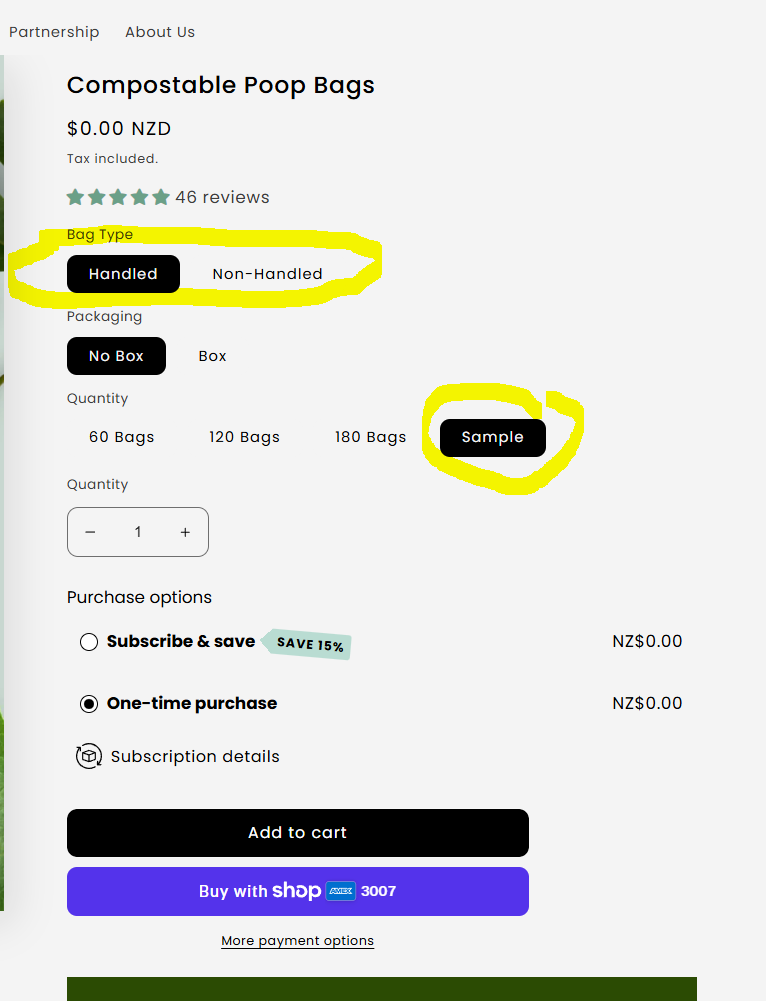
Here is the custom code solution:
document.addEventListener('DOMContentLoaded', function() {
  const variantOptions = document.querySelectorAll('[data-index]');
  const addToCartBtn = document.querySelector('button[name="add"]');

  function checkSample() {
    let isSample = false;

    // Check if "Sample" is selected in any variant option
    document.querySelectorAll('input[type="radio"], select').forEach(el => {
      if (el.value === 'Sample' || el.textContent.includes('Sample')) {
        isSample = true;
      }
    });

    // Hide or show the button
    if (addToCartBtn) {
      addToCartBtn.style.display = isSample ? 'none' : 'block';
    }
  }

  // Check on page load
  checkSample();

  // Check whenever variant options change
  document.querySelectorAll('input[type="radio"], select').forEach(el => {
    el.addEventListener('change', checkSample);
  });
});
In your Shopify admin, go to Products → Edit your “Sample” product
Scroll to Product Organization → Scroll down to find the Code/Custom Fluid section
Or go to Sales channel → Online store → Themes → Edit code
product-template.liquid or find your product page template
Paste the code before the closing tag or in the section
Alternatively, if your theme uses Shopify’s new architecture, you may need to add it via theme settings or a custom app, depending on your Shopify plan.
The code will check the “Sample” selections and toggle the button’s visibility accordingly. If your theme uses a different button structure, you may need to adjust the selector for ‘Button[name=‘Add’]’—inspect the button element to confirm.
I am having trouble locating the right section to paste the code. Are you able to assist?
You can do that without editing theme code.
You can add a “Custom liquid” section/block to the product page template and paste the following code:
{% if customer && customer.tags contains "sample-claimed" %}
  <style>
    [value="Sample"], [value="Sample"]+label {
      display: none !important;
    }
  </style>
{% endif %}
This will hide the “Sample” button on the product page.
However, this is not the best approach.
Say, I am not logged in and add a sample to my cart; then I login and checkout with sample in cart.
Even if I am logged in, there are ways to add the item to cart.
More secure way is to make a sample a paid variant, but create a discount, called, say, “Free sample”, and make it to offset your sample product to become free. Make it “once per customer” and your goal is achieved.
Mention it right there on the product page and people will be able to type it in at checkout. Or can add a button to apply the discount.
That is a good solution. Is there a way to apply the discount automatically at checkout instead AND for once per customer?
Not directly – unfortunately, automatic discounts do not have limit per user.
However, you can still use auto discount, but make it apply only to specific customers segment.
Then you define segment like customers who did not purchase sample product (if it’s a separate product, segments can’t target variants).
If it’s not a separate product, then need 2-step process:
- segment would include customers without tag “sample-claimed”;
- there will be a Flow to run when order is created, check if it contains the sample variant and assign “sample-claimed” to this order customer.
You can hide the Add to Cart button for a product with a specific tag using Liquid code. Using Liquid is the best option because it works directly in your Shopify theme and lets you show or hide content based on product tags easily. This is simple-
- Go to Online Store → Themes → Edit Code.
- Open your product template file, usually
Sections/product-template.liquidorTemplates/product.liquid. - Find the Add to Cart button in the code.
- Wrap it with this
unlesscondition:
{% unless customer and customer.tags contains "sample claimed" %}
  <button type="submit" class="btn add-to-cart">Add to cart</button>
{% endunless %}
This code works by checking if the customer is logged in, has the tag, and is viewing the correct product. If all conditions are true, the Add to Cart button is hidden. If the customer hasn’t claimed the sample yet, the button displays as normal.