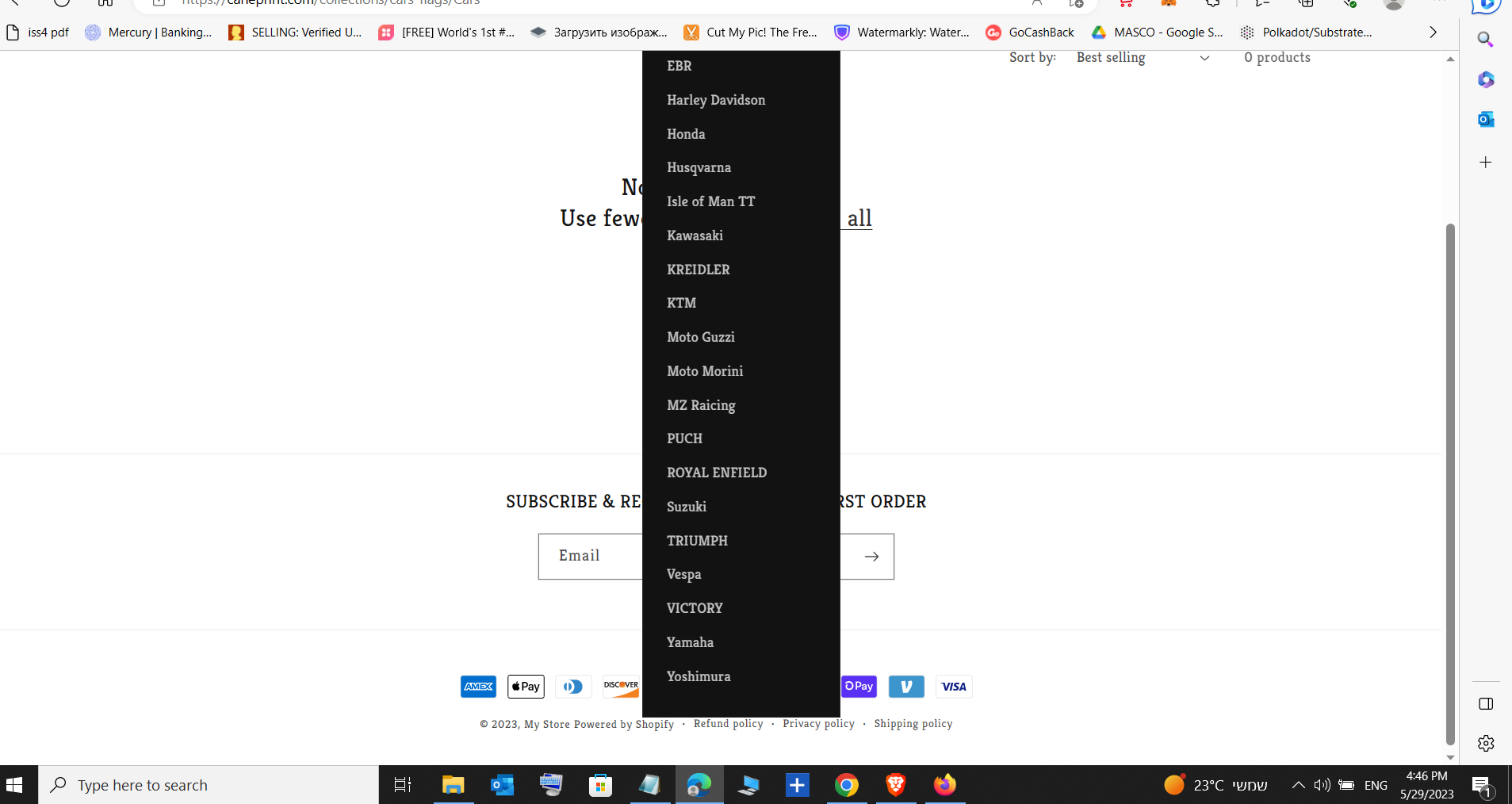
Hello.
My web don’t have scroll on desktop (drop down menu)
2 hours I’m playing with CSS or media code in theme, base files..
It’s doesn’t works.. How I can change this overflow?
Thanks
Hello.
My web don’t have scroll on desktop (drop down menu)
2 hours I’m playing with CSS or media code in theme, base files..
It’s doesn’t works.. How I can change this overflow?
Thanks
Could you please share your store URL? so, I can check and guide you to solve the issue.
The website is scrolling well when the dropdown menu is open on the desktop. What issue you are facing?
It’s working fine on my end.
This code I use before on my custom theme .
{
display: inline-block;
max-height: 40px;
max-width: 110px;
overflow: hidden;
}
but on DOWN I need something other
So, do you want a scroll bar in the menu dropdown? correct me if I am wrong.
and still, If I don’t get you let’s connect and discuss
YES!!!
Add the below line of CSS code at the end of your base.css file.
body .js details>.header__submenu{
max-height:60vh;
overflow: auto;
}
let me know if you have any issue with this.
But I use this one, CSS without body, and it’s working!!! Thank you!
.header__submenu {
max-height: 60vh;
overflow: auto;
}