Hey, even if I’ve disabled the 2nd picture on hover in the the products page, if I click on a product, the related products below they still have it. Could you help me fix it?
May I suggest to update code these steps:
- Go to Store Online-> theme → edit code
- Assets/base.css
- add code below to bottom of file
.media.media--hover-effect > img + img {
  opacity: 0 !important;
}
.card__media .media img {
	 opacity: 1 !important;
}
Hello @MariaMcGraw ,
You can check out my suggestion below to get your concern resolved:
- Go to Edit code on Online Store:
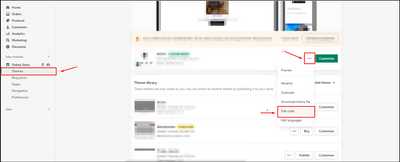
- add my code above the tag on Theme.liquid:
I hope you find the answer helpful.
Kind & Best regards,
GemPages Support Team.
Hi @MariaMcGraw ,
Please go to Actions > Edit code > Assets > base.css file and paste this at the bottom of the file:
.card-wrapper:hover .media.media--hover-effect>img:first-child:not(:only-child) {
    opacity: 1 !important;
    transition: transform var(--duration-long) ease;
    transform: scale(1.03);
}
.card-wrapper:hover .media.media--hover-effect>img+img {
    opacity: 0 !important;
}
Hope it helps!