Have tried to implement the instructions for other themes however Crave has a different file structure as it is a 2.0 theme.
There is no theme.scss.liquid file. Also the navigation menu items have a different references.
Please help with code make a dropdown hover menu on Crave theme.
Hey @wbalaile !
Go to the “component-list-menu.css” file which you can find in the “Assets” folder. Then add the following code snippet to the very bottom of the file (this will add background color to the sub-menu items on hover).
.header__submenu.list-menu li:hover {
  background-color: red;
}
If you want to add a hover effect to the menu items in the header, add this code snippet:
.header__inline-menu li:hover {
  background-color: red;
}
Of course, you can adjust the colors as you see fit, or you can add any other styles you want.
If this fixes your issue, please mark my reply as a solution.
I have tried the fix you suggested, it changes the menu item background colour only. The fix I am looking for is to have a dropdown menu on hover, not a change in background colour.
Thanks for clarifying this @wbalaile !
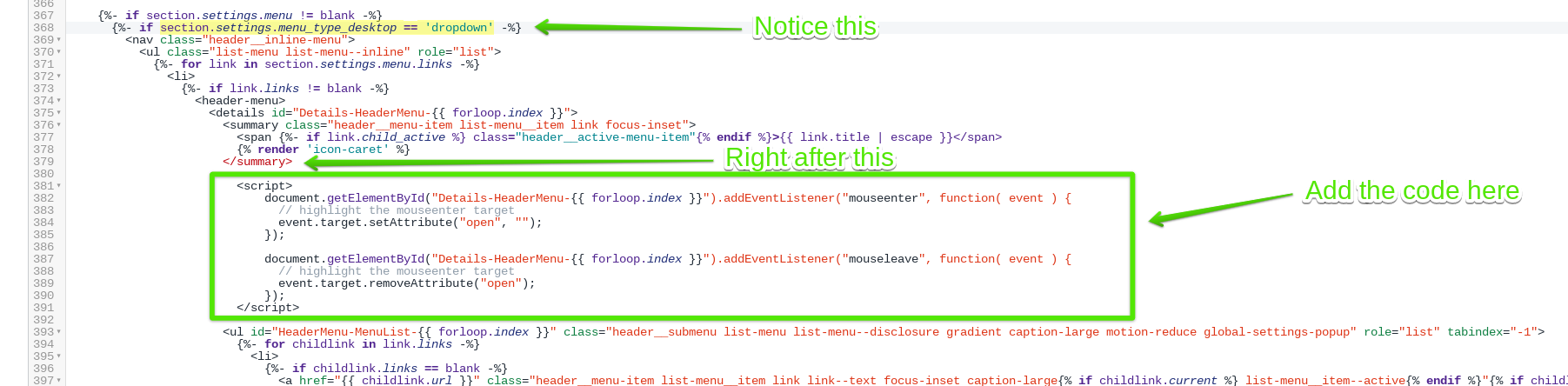
This will need to be done using JavaScript. Please go to your (header.liquid) file which can be found in the “sections” folder, and add the following code snippet.
Now the most important thing is where to place this code snippet. You will need to place it right after the () tag inside the (if statement) that has the condition (section.settings.menu_type_desktop == ‘dropdown’)
I will highlight the code position in the below screenshot:
This will make your drop-down menu show on hover as you can see in the below gif.

I also attached my header.liquid file so you can copy and paste the entire code if you want to.
Please mark my reply as a solution if this fixes your issue.
1 Like
Thank you so much for this!
I’ve enabled the hover effect for my current CRAVE theme.
Is there any way to minimize all the extra space showing to the right of the submenu items?
The hover background extends beyond the screen. Thanks so much again.
https://comicskingdom.myshopify.com/
https://shop.comicskingdom.com