If somone can do this, I’d like the box to be the lighter blue (color code: #B3D9FC)

Add This css in your edit Code > base.css File
.header__inline-menu .header__active-menu-item{
	background:#B3D9FC;
    text-decoration: unset;
    border-radius:5px;
}
.header__menu-item span{
	padding:0.8rem;
}
.header__inline-menu .header__menu-item{
	padding:0 0.5rem;
}
Hi @robertbarta Please add the code in your theme.css/base.css/style.css file which is available in your theme.
.header__active-menu-item {
    color: white;
    border-radius: 3px;
    background-color: red; //change color according to your needs.
    text-decoration: none;
}

.header__menu-item span{
	padding:1px;
}
.header__inline-menu .header__menu-item{
	padding:0 7px;
}
If you are not sure where is your theme.css/base.css/index.css/style.css file please follow the steps:
- Login in shopify admin.
- Click on the Online Store.
- Then click on the button next to Customize in live Theme.
- Click Edit Code.
- Search theme.css/base.css/index.css/style.css in the code in left hand side which ever is available in your theme.
- You can add the above code at the bottom of the file.
Result:
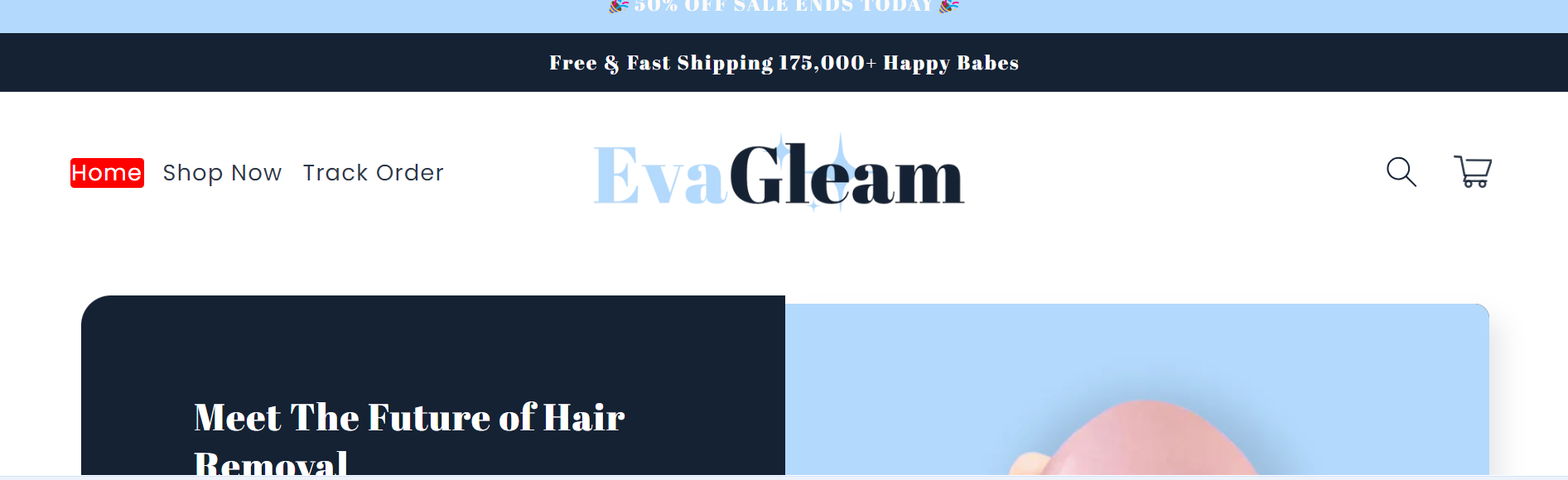
Hopefully it will help you. If yes then Please don’t forget hit Like and Mark it as solution!
Best Regards
Sahil
1 Like

Hi @robertbarta Add this code as well.
.header__active-menu-item {
    text-decoration: none !important; //Just add this line in the previous code which I have provided.
}
Hopefully it will help you. If yes then Please don’t forget hit Like and Mark it as solution!
Best Regards
Sahil
1 Like
Okay, thank you! Are you able to fix the background on the menu? I noticed that the code causes the menu background to be transparent as opposed to white. it does it for the sticky add-to-cart, as well as the menu on mobile view:


Hello?