Formatting order notes with order printer

Topic summary

A user is experiencing an issue where order notes in Shopify’s Order Printer app are displaying as a single paragraph instead of preserving line breaks from the original formatting.

Problem Details:

  • Order notes appear properly formatted with line breaks in Shopify’s backend
  • When printed, all items merge into one continuous paragraph, making them difficult to read

Solution Provided:

  • Navigate to Order Printer (legacy) app → Manage templates
  • Edit the default template
  • Replace the existing order note code {{ order.note }} with {{ note | newline_to_br }}
  • This filter converts line breaks into HTML <br> tags, preserving the original formatting

Resolution:
The issue was resolved quickly with the provided code fix, which the original poster confirmed worked and was easy to implement.

Summarized with AI on November 4. AI used: claude-sonnet-4-5-20250929.

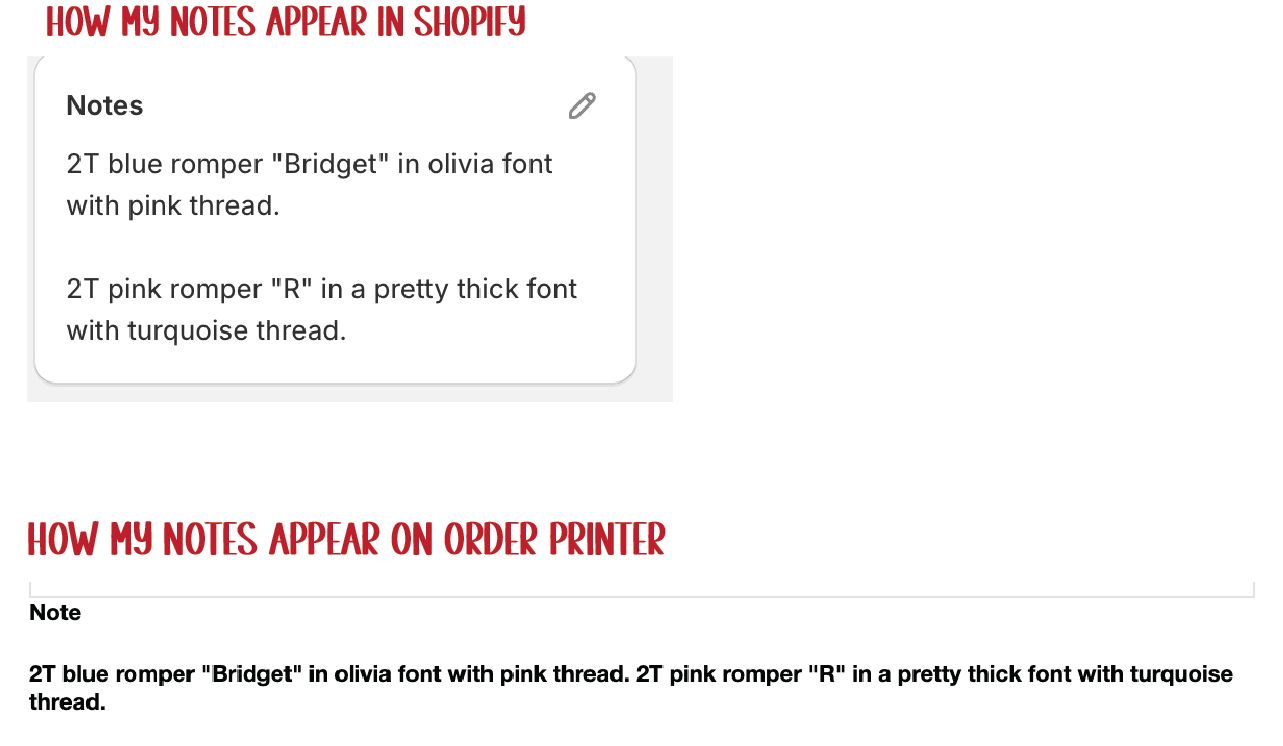
Hello! I am looking for assistance in editing my code so that my order notes will hold line breaks. As you can see in my order note on shopify I have each item broken apart and when printing my orders it is merging everything into a paragraph. This is very hard to follow and I often find myself having to open the app to view the notes with the line breaks.

My code is as follows

<b{% if order.note %}

Note

{{ order.note }}

{% endif %}
Error in your first line of code.
Use this one

{% if order.note %}
    ## Note
    

{{ order.note }}

{% endif %}

Hi @rileycreekd ,

You can follow these steps:

  • Step 1: Go to Order Printer (legacy) app > Manage templates.

  • Step 2: Edit template default > Find ‘{{ note }}’ and add code:

Code:

{{ note | newline_to_br }}

Thank you so much for a quick and easy to follow answer!!

1 Like

Hi @rileycreekd ,

You’re welcome and nice to meet you :blush: