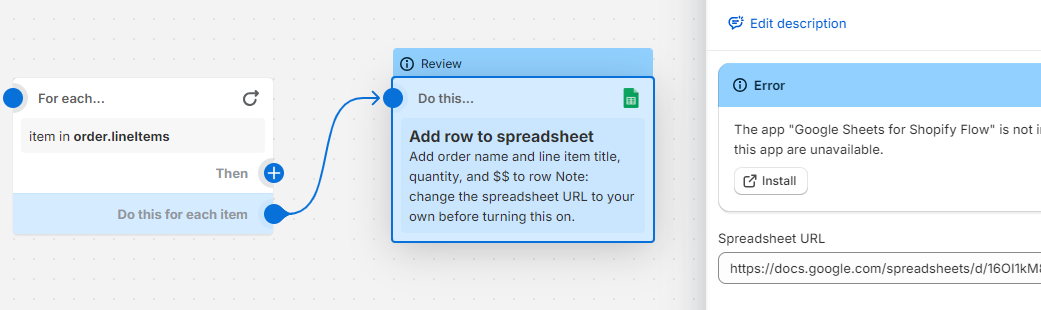
A user is experiencing recurring disconnections between Shopify Flow and Google Sheets when attempting to send order data from multiple stores. The flow initially works but stops after a few days, showing a 403 error indicating permission issues.
Key troubleshooting attempts:
The Gmail account used is the spreadsheet owner with non-expiring access
The correct browser URL (not share link) is being used
Tab names are verified correct, as reconnecting temporarily restores functionality
Suggested solutions:
Verify spreadsheet sharing settings
Check if the sheet has exceeded Google’s row/field limits
Contact Google Support to investigate why the 403 error is being returned
Additional concerns raised:
Flow’s Google Sheets implementation lacks clarity about which user credentials are being used for connections
Multiple users report similar disconnection issues
Status: Unresolved. The root cause remains unclear, with suggestions pointing toward either Google Sheets API limitations or Flow’s connection management. Screenshots show the error messages and connection settings being discussed.
Summarized with AI on October 26.
AI used: claude-sonnet-4-5-20250929.
I’ve made a flow to send order details from multiple Shopify stores into a Google sheet. After a few days, I noticed it was missing some order data, so I checked some websites and the linked Google Sheets account was disconnected, even though it was connected and sent data before. Can someone please help me understand why it’s doing this and if this is a Flow proper or is the gmail issue? There is no point in sending data if it will just disconnect on its own everyday.
The google sheet disconnected automatically from the flow. The linked gmail account is the owner of the sheet so I’m not sure why it’s disconnecting on its own. When I check the gmail account settings, it says access doesn’t expire so not sure what’s happening.
You may need to contact Sheets to understand why it’s returning that error. I don’t think the error message is fully accurate here.
But one thing I noticed is your sheets URL is the share link but the API wants the URL from the browser (as specified in our docs). Try that instead. Also double-check that you have the right tab name.
If stripping off that sharing part doesn’t work, I think you should contact Google support for why they are returning a 403. You can also check if the spreadsheet has too many rows/fields in it. Sheets has a max limit.
Honestly, the implementation here leaves a lot to be desired. For MESA, you can have multiple connections, each with their own credentials–and then you choose which one you want to use for that block. For Shopify Flow, I have no idea what user is trying to connect – so I’m not sure who to grant access to. I have gotten a couple Flows to work with Google Sheets but I have no idea why or what the differences are.
Is there a way to specify or at least detect what user Flow is trying to connect to Google with?
Yeah the action header is missing a link to the connection we are using. But you can find it by adding a new Action, searching for Sheets and choose the Sheets app (not the Add row to sheets action).

 Google Sheets linked to Flow keeps disconnecting