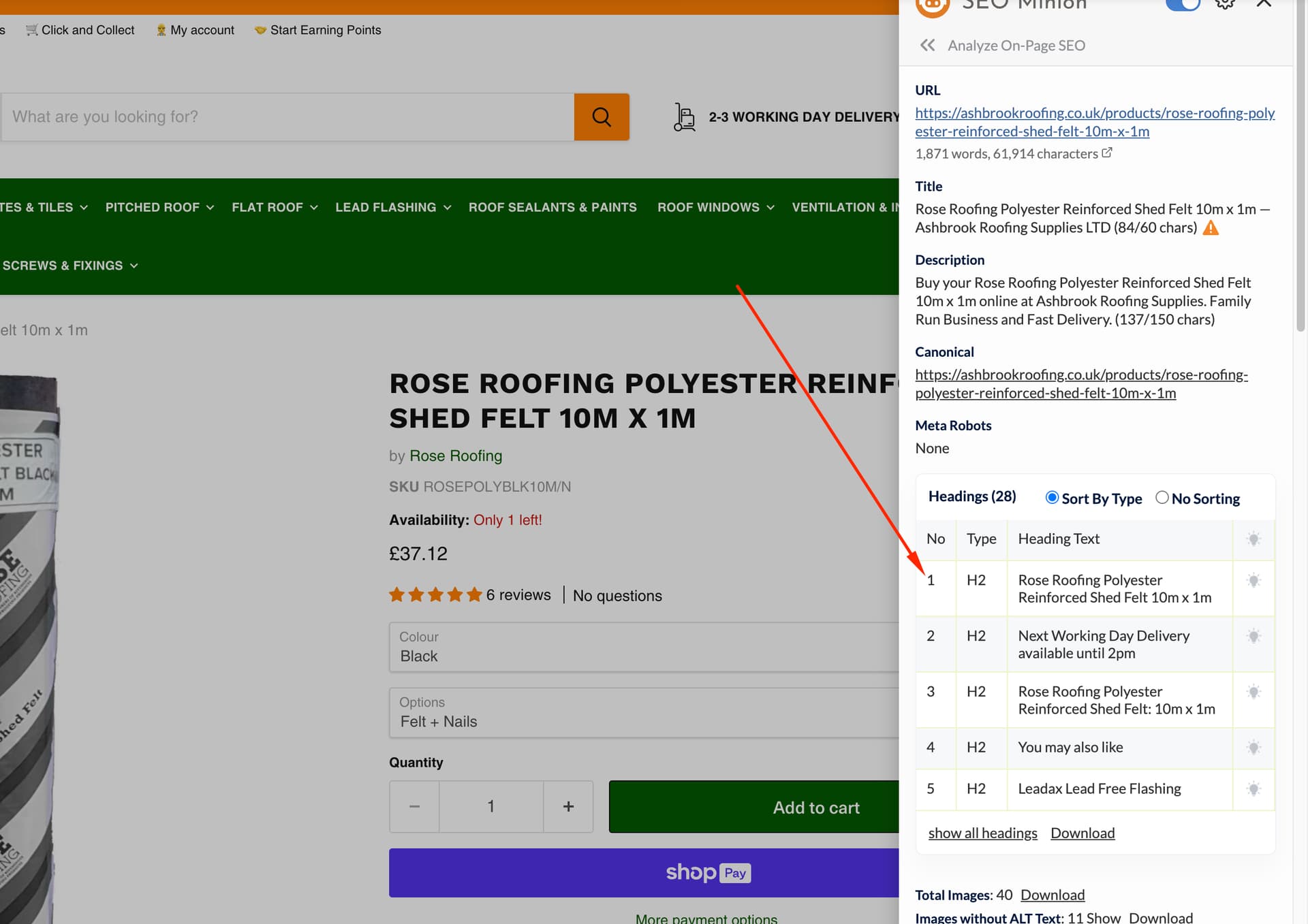
A site audit revealed 373 pages missing H1 headings on a Shopify store using the Empire theme. The issue was confirmed on product pages, where the H1 tag—critical for SEO and search engine understanding—is absent.
Possible causes:
Theme code modifications or specific product templates (some Empire variants use H2 instead of H1)
Some themes reserve H1 for the logo/brand in the site header
Theme developers may prioritize design over SEO best practices
Proposed solutions:
Add custom code between <body> and </body> tags in theme.liquid file to programmatically insert H1 tags for product pages
Review theme templates to identify where H1 was removed or replaced
Key debate: One participant cautioned against blindly following audit tool recommendations without actual SEO expertise, though others confirmed H1 tags are essential for search visibility.
The discussion remains open with multiple offers to provide specific code fixes or direct assistance. A screenshot was shared confirming the missing H1 element.
Summarized with AI on October 26.
AI used: claude-sonnet-4-5-20250929.
Is it possible that you’ve modified your theme code?
What product template are you using?
Fresh Empire from theme store has H1 for the product title in default product template, but H2 in “pre-order” and “3-column”
This is Jeffery from SEOAnt and after my carefully checking the page URL you shared, I do fail to find out the H1 on this product page.
Our Team has handled several kinds of related issues for years and you can put below H1 code between <body> and </body> in theme.liquid file to solve this issue. If it is not working still, please share the code in your theme.liquid and I can take a further look for you specifically. Thank you!
{% if template.name =='product' %}
<h1 style="display:none">{{product.title}}</h1>
{% endif %}
Hey @sales_2797,
In order to fulfill the SEO requirements that your page must have a h1 tag to ensure it’s should show in Google Search results. This requires to do the custom code in your theme file.
Could you please share the 4 digits collab code in the p/m so that I can take a look and add the h1 tag.
Waiting to hear back from you.
Thanks
Yes, you’re definitely missing an H1 tag—and that’s bad for SEO. The H1 is one of the most important on-page elements for helping search engines understand what the page is about.
This should be a simple fix. The issue is that many theme or app developers aren’t SEO experts—they focus more on design or technical implementation, so SEO best practices often get missed. Always a good idea to run an SEO audit on your theme before launch to catch things like this early.