
@MaryV hello can you share the store URL so can try to provide solution
@MaryV you try adding this css to theme.scss.css
this will get you make some titles like this
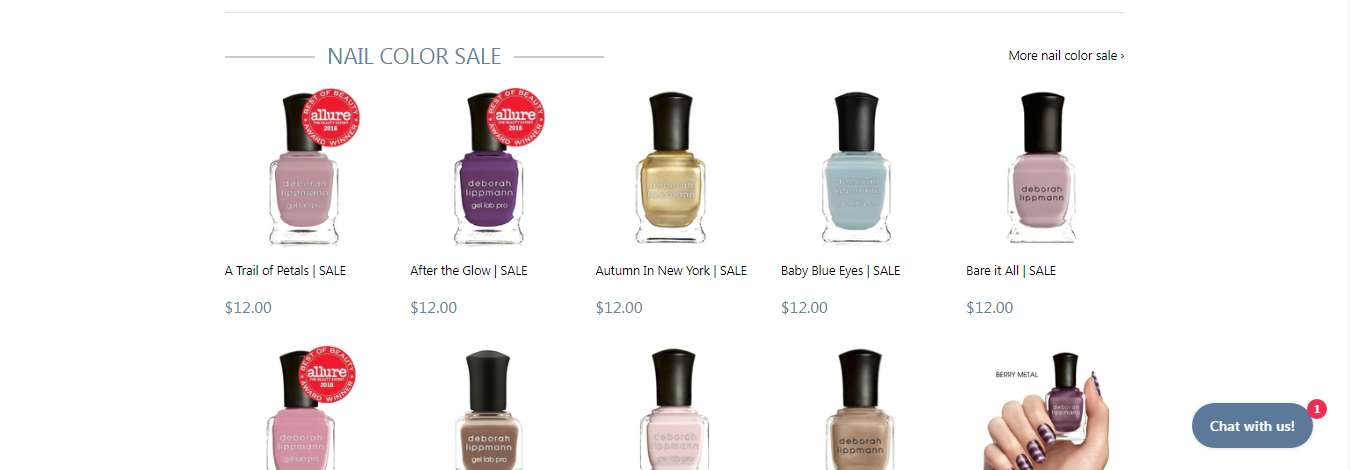
p.h1.section-header–left:before {
content: ‘’;
width: 100px;
background-color: #ccc;
height: 2px;
display: inline-block;
margin-bottom: 7px;
margin-right: 14px;
}
p.h1.section-header–left:after {
content: ‘’;
width: 100px;
background-color: #ccc;
height: 2px;
display: inline-block;
margin-bottom: 7px;
margin-left: 14px;
}
works beautifully! thank you!!
one more question, how can I align to the center of the page (the text and lines)?
p.h1.section-header–left {
text-align: center;
}
Hi-I tried that. It doesn’t compltetly center it
you can add padding with align right
@media (min-width:769px) {
p.h1.section-header–left {
text-align: right;
padding-right:22%;
}
}
@media (max-width:768px) {
p.h1.section-header–left {
text-align:center;
}
}

try this updated css
@media (min-width: 769px) {
p.h1.section-header–left {
text-align: right;
padding-right:30px
}
.section-header–right {
width: fit-content;
}
}
@media (max-width:768px) {
p.h1.section-header–left {
text-align:center;
}
}
works perfectly. thank you!
The borders doesnt fit on small screen you need to resize them on small screen here updated css
@media (min-width: 769px) {
p.h1.section-header–left {
text-align: right;
padding-right:30px
}
.section-header–right {
width: fit-content;
}
}
@media (max-width:768px) {
p.h1.section-header–left {
text-align:center;
font-size:19px;
}
p.h1.section-header–left:before, p.h1.section-header–left:after {
max-width: 46px;
}
}