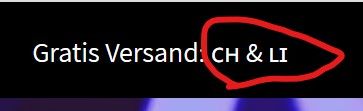
A user wants to display country flag emojis in their Shopify announcement bar, but flags only render correctly on mobile devices—appearing as letter codes on Windows 10 Chrome instead.
Both methods failed to resolve the desktop rendering issue
Root Cause & Recommendations:
The problem stems from inconsistent emoji/unicode support across platforms and browsers. One contributor explains that text-based flag emojis won’t work reliably everywhere.
Proposed Alternatives:
Use actual flag images or SVG files instead of unicode characters
Implement Shopify’s Liquid country objects for flag rendering
Source public domain flag images from repositories like GitHub
Consider theme customization to properly integrate flag images
One response suggests enabling “Social Media Icons” in the announcement bar settings, though this appears tangential to the core flag display issue. The discussion remains open with no confirmed working solution for emoji-based flags on desktop browsers.
Summarized with AI on October 26.
AI used: claude-sonnet-4-5-20250929.
I want to add a country flag to my announcement bar in Shopify. When I copy them from an emoji page like: https://getemoji.com/ and paste them into shopify they appear on my Windows 10 Chrome Browser like this:
@CuteBlastSAMO if direct characters/text/unicode doesn’t work then you need to use actual images/svgs as encoding like that just wont work for everyone/everywhere.
Which means a theme customization to add that code.
Either using the localization>country objects Liquid objects: country