How can I add quantity buttons to the Debut theme?

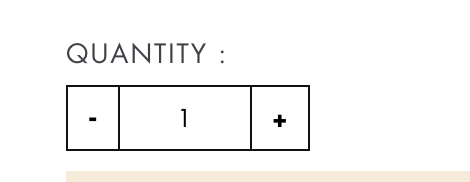
I currently have a quantity setup on my products, however the Debut theme doesn’t have any css for the increase/decrease value buttons and so it uses the default for your device. How can I make my quantity field look like this

instead of this?

I don’t care about the font, I just like the buttons.

Thank you so much,
Owen

Hi @OHutchyHutch

Follow this:

  1. Go to theme customize theme editor->select product page->tick “Show quantity selector” box from left side.

  1. Go to section->product-template.liquid ->find {% if section.settings.show_quantity_selector %} and comment code that in between condition (only product-form__item–quantity this div ). and paste bellow:
 <div class="qtydiv">
          <label for="Quantity" class="quantity-selector">Quantity</label>
          <div class="qtybox">
            <span class="btnqty qtyminus icon icon-minus">-</span>
            <input type="text" id="quantity" name="quantity" value="1" min="1" class="quantity-selector quantity-input" readonly="">
            <span class="btnqty qtyplus icon icon-plus">+</span>
          </div>
        </div>
  1. Go to Asset->theme.scss file and add this code at bottom
.qtydiv label{display: block;margin-bottom: 12px;letter-spacing: 2.8px;color: #747a7b;}
.qtydiv .btnqty{display: inline-block;cursor: pointer;user-select: none;font-size: 25px;padding: 5px;line-height: 5px;}
.qtydiv .btnqty.qtyminus{margin-right: 8px;}
.qtydiv .btnqty.qtyplus{margin-left: 8px;}
.qtydiv .quantity-input{border: none;border: none;padding: 8px;text-align: center;width: 50px;outline: none;display: inline-block;}
.qtydiv {display: inline-block;padding-right: 15px;padding-top: 10px;}
  1. Go to Asset->theme.js and add this code at bottom:
$('.qtybox .btnqty').on('click', function(){
  var qty = parseInt($(this).parent('.qtybox').find('.quantity-input').val());
  if($(this).hasClass('qtyplus')) {
    qty++;
  }else {
    if(qty > 1) {
      qty--;
    }
  }
  qty = (isNaN(qty))?1:qty;
  $(this).parent('.qtybox').find('.quantity-input').val(qty);
}); 

Let me know if you need help.

6 Likes

That worked, thank you so much! Just a few quick questions, the buttons get pushed off to a new line because we have a box to select sizes that is quite large. Do you happen to know where I can find the scss for the box to change the size? Also as you can see the text is different, how can we go about making the text for quantity to be the same font as Size? And one last thing, when I add to cart it adds the correct number of items however the cart notification only says I added 1?

Sorry for bugging you with even more questions, they’re just tiny details now, though!

I really appreciate it, thank you!
Owen

Same here! Would love to know how to show correct # of items in cart (under Qty) after using that method.

Thanks,

1 Like

Send your store url

If you are using Debut, I was able to solve the issue of the incorrect number being displayed in the cart notification by editing the cart-popup.liquid

It has been awhile since I have done it and I don’t remember what it initially was and what I changed but this is what I currently have if it helps. It is the default debut popup but with quantity fixed.

{%- style -%}
  {% assign cart_popup_box_shadow = settings.color_borders | color_modify: 'alpha', 0.5 %}

  .cart-popup {
    box-shadow: 1px 1px 10px 2px {{ cart_popup_box_shadow }};
  }
{%- endstyle -%}

<div class="cart-popup-wrapper cart-popup-wrapper--hidden" role="dialog" aria-modal="true" aria-labelledby="CartPopupHeading" data-cart-popup-wrapper>
  <div class="cart-popup" data-cart-popup tabindex="-1">
    <h2 id="CartPopupHeading" class="cart-popup__heading">{{ 'cart.popup.added_to_cart' | t }}</h2>
    <button class="cart-popup__close" aria-label="{{ 'general.accessibility.close_modal' | t }}" data-cart-popup-close>{% include 'icon-close' %}</button>

    <div class="cart-popup-item">
      <div class="cart-popup-item__image-wrapper hide" data-cart-popup-image-wrapper>
        <div class="cart-popup-item__image-placeholder" data-cart-popup-image-placeholder>
          <div class="placeholder-background placeholder-background--animation"></div>
        </div>
      </div>
      <div class="cart-popup-item__description">
        <div>
          <div class="cart-popup-item__title" data-cart-popup-title></div>
          <ul class="product-details" aria-label="{{ 'cart.popup.product_details' | t }}" data-cart-popup-product-details></ul>
        </div>
        <div class="cart-popup-item__quantity">
          <span class="visually-hidden" data-cart-popup-quantity-label></span>
          <span aria-hidden="true">{{ 'cart.popup.quantity' | t }}:</span>
          <span aria-hidden="true" data-cart-popup-quantity></span>
        </div>
      </div>
    </div>

    <a href="{{ routes.cart_url }}" class="cart-popup__cta-link btn btn--secondary-accent">
      {{ 'products.product.view_cart' | t }} (<span data-cart-popup-cart-quantity></span>)
    </a>

    <div class="cart-popup__dismiss">
      <button class="cart-popup__dismiss-button text-link text-link--accent" data-cart-popup-dismiss>
        {{ 'cart.general.continue_shopping' | t }}
      </button>
    </div>
  </div>
</div>

if this doesn’t work then it is one of the other things I changed. Please pm me and I’ll try to help you out :slight_smile:

1 Like

Please, I followed all the steps, but by the end, I have a tow quantity button.

how can I remove the olde one?

Thank you.

Go to section->product-template.liquid ->find {% if section.settings.show_quantity_selector %} and comment code that in between condition

The code is not working, it still shows wrong quantity in the popup box. The Quantity inside the View Cart button is correct but not in the one next to the Title. Please help.

Send you store url and code for product page because cart popup is custom so you have to set by your custom code

I am using the Debut theme and I followed your code however the javascript doesn’t seem to wanna work for me

HI @benjk

have you added js code in asset->theme.js file and still not working then its issue of your theme, so may be i have to check in code. so send your store url

How should I change the font and add the border of the Quantity button?

Hi @amelia22

You can try this css for qty box css:

Add in asset->theme.scss file

#Quantity-product-template{font-family: cursive; border: 2px solid red;}

If you have standard debut theme then it will work other wise send me store url.

Hi, I am using the Debut Theme. The new css that you mentioned is for the original template. Here is the sample of the border that I would like to add for the qty box. Can you tell me how and which line under theme.scss should I insert the new css? Thanks.

Send your store url so i can check

Hello!

I am having the same issue. We are using Debut and we need to be able to add quantities to product pages.

Could you help me?

Thanks,
Maria

I need to add a quantity selector for each product in debut theme but I couldn’t find any option to do it

If you have not qty box on your product page then first enable it from theme editor.

  1. go to theme editor->product page->from left side section open “product” tab and then tick qty box option.

  2. After that add my given code in file by following steps.

To properly show the Qty value in the cart popup notification, make sure you add the data field, ‘data-quantity-input’ into the line.