I’m trying to change the header of the sign up section in the footer.
I can only find where to change to description, but not the heading.
Can someone direct me?
I’m trying to change the header of the sign up section in the footer.
I can only find where to change to description, but not the heading.
Can someone direct me?
can you please send store url so i will check and let you know
Hi there @HelleGoller . I’m happy to look into this with you! Which theme are you currently using for your online store? Are you using Shopify Email for your email marketing?
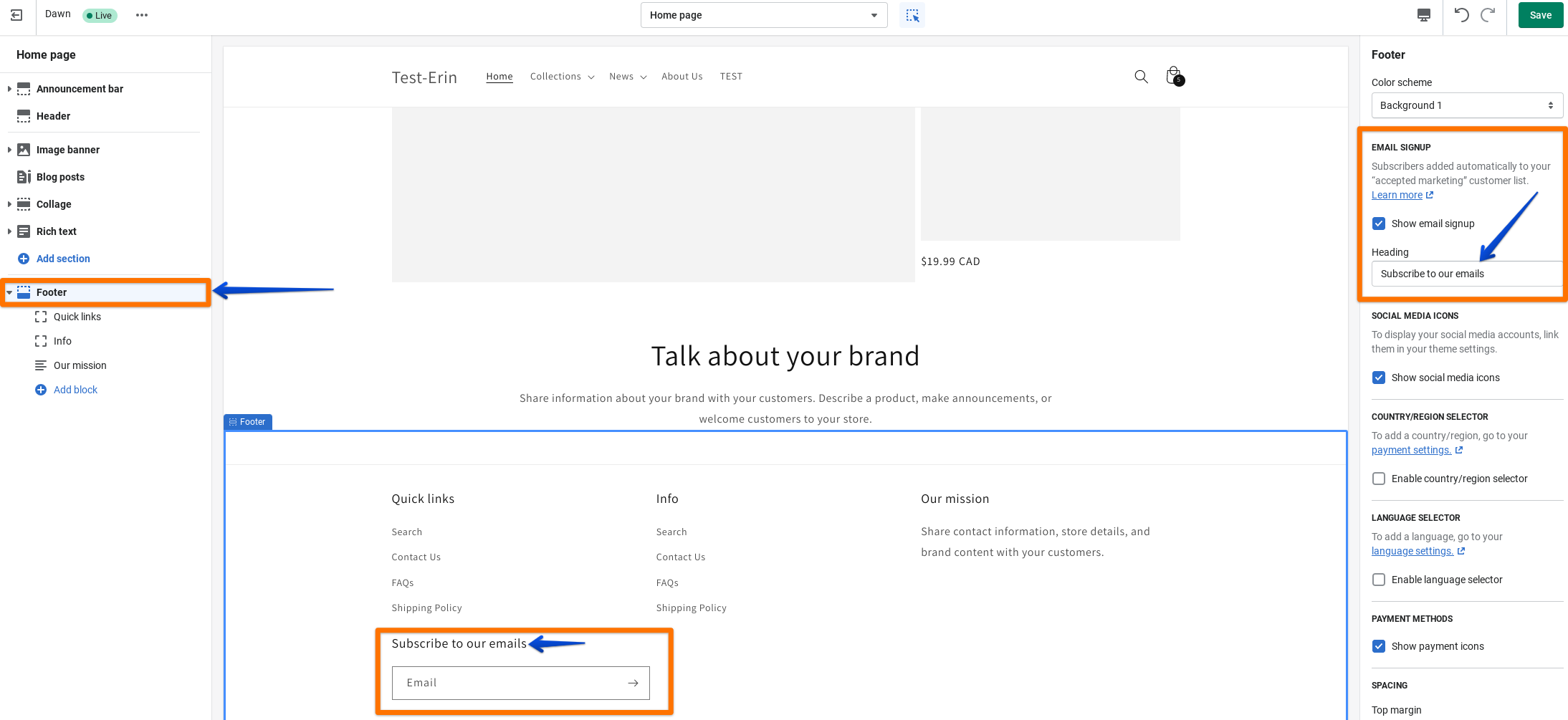
You can typically change the header for the newsletter sign up section in your footer within your theme editor. You can get to your theme editor by going to Online store > Themes and clicking Customize next to the theme you are working with. Once you are in your theme editor you will want to click on the Footer section and the footer settings will open. There, you should see the option to edit the Heading under the Email signup settings. I’ve included an example of what this may look like below. That being said, these settings depend on the theme you are using so the options may be different depending on your theme. If you are not seeing the setting after following these steps please let me know which theme you are using and I can take a closer look.
Don’t hesitate to reach back out if you have any other questions!
i have check now its show on footer
But I want to change it?
HI,
I do not have the option in the right side of the screen as you?
When I click ‘footer’ in the left side, I only go to Theme settings - also in the left side of the screen.
The theme is:
Design and support by Troop Themes
can you please send footer section code
Where do I find this?
{%- assign block_count = section.blocks.size -%}
{% if block_count > 0 %}
{%- assign column_count = 12 | divided_by: block_count -%}
{% endif %}
{% for block in section.blocks limit: block_count %}
{% case block.type %}
{% when ‘about’ %}
{% unless shop.enabled_payment_types == empty %}
{% if block.settings.footer-payment-options-show %}
{% include ‘framework–payment-icons’ %}
{% endif %}
{% endunless %}
{% when ‘subscribe’ %}
{% assign show_social = false %}
{% if settings.footer-facebook-follow-url.size > 0 or
settings.footer-twitter-follow-url.size > 0 or
settings.footer-instagram-follow-url.size > 0 or
settings.footer-pinterest-follow-url.size > 0 or
settings.footer-tumblr-follow-url.size > 0 or
settings.footer-vimeo-follow-url.size > 0 or
settings.footer-youtube-follow-url.size > 0 %}
{% assign show_social = true %}
{% endif %}
{% if block.settings.subscribe–show-social-icons == false %}
{% assign show_social = false %}
{% endif %}
{% if block.settings.subscribe–show-newsletter or show_social %}
{% assign newsletter_title = ‘layout.footer.newsletter_title’ | t %}
{% if newsletter_title.size > 0 %}
{% form ‘customer’ %}
{% if form.errors %}
{% for field in form.errors %} {{ field }} {{ form.errors.messages[field] }} {% endfor %}
{% endif %}{% if form.posted_successfully? or form.errors %}
{% endif %}
{% endform %}
{% if show_social %}
{% endcase %}
{% if section.blocks.size == 0 %}
{% include ‘snippet-no-blocks’ %}
{% endif %}
{% schema %}
{
“name”: “Footer”,
“class”: “section–footer”,
“max_blocks”: 3,
“blocks”: [
{
“type”: “about”,
“name”: “About store”,
“settings”: [
{
“type”: “text”,
“id”: “about-title”,
“label”: “Title”,
“default”: “Store”
},
{
“type”: “richtext”,
“id”: “text”,
“label”: “Text”,
“default”: “
© Your brand name here
”
},
{
“type”: “checkbox”,
“id”: “footer-payment-options-show”,
“label”: “Enable payment logos”,
“default”: true
}
]
},
{
“type”: “menu”,
“name”: “Menu”,
“settings”: [
{
“type”: “text”,
“id”: “menu-title”,
“label”: “Title”,
“default”: “Info”
},
{
“type”: “link_list”,
“id”: “menu”,
“label”: “Menu”,
“default”: “footer”,
“info”: “This menu won’t show submenu items.”
}
]
},
{
“type”: “subscribe”,
“name”: “Subscribe”,
“settings”: [
{
“id”: “newsletter–heading”,
“label”: “Newsletter heading”,
“type”: “richtext”,
“default”: “
Sign up to our mailing list
”thanks can you try this way if need change heading
check here https://help.shopify.com/en/manual/online-store/themes/customizing-themes/language/translate-theme
also change sub text go to theme customization >>> footer >> click arrow before F
I dont have have the option ‘customization >>> footer >> click arrow before F’
If I click here I just go the the theme settings.
Where should I look in the link you send?
if possible to add me staff account so i will quick check
It is not my account, bud a clients, so cannot give you access.
no rush just download theme and send theme zip i will check my end
Here you go!
I would like to change the header and also ad the option to put in name
Many thanks - that works!
do you know where to add the name as well?
please provide screenshot which name did you have change
when you subcribe to the newsletter, to have the option to add ‘name’ also