How can I center the announcement bar in the Broadcast theme?

Topic summary

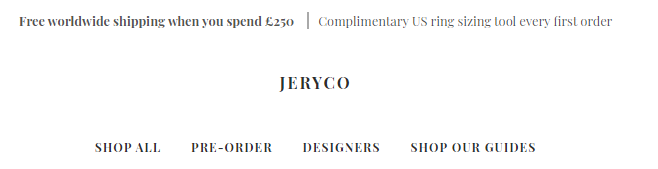
Issue: In the Shopify Broadcast theme, the announcement bar appears slightly left of center. The store is unpublished; a preview link was shared.

Details: The bar only appears centered when the text on both sides of a vertical divider (“|”) is exactly the same length. When lengths differ, the bar shifts left, indicating the current alignment depends on balanced content rather than true centering.

Evidence: A screenshot was uploaded showing the off-center alignment; this visual is central to understanding the issue.

Interaction: A helper requested a screenshot to clarify the problem. The store owner provided the screenshot and reiterated the goal: a consistently centered announcement bar regardless of content length on either side of the divider.

Status: No solution or code changes have been provided yet. The thread remains open, awaiting guidance on how to center the bar independently of content length.

Summarized with AI on March 3. AI used: gpt-5.

Hello all,

I am noticing my announcement bar isn’t in the center of the page, its slightly off and it’s really bugging me. Please can someone help :slightly_smiling_face:

My website isn’t published, link https://c3qk920k0f38b74f-52511113411.shopifypreview.com

Best wishes,
Anna

hello @911B891

can you please share some screenshot to what do you want

Hello, I am wanted the announcement bar to be center, as you can see from the screen shot it is off center, more to the left. I can only make it center if the information on both sides are exactly the same length content.

Hello @Kinjaldavra

Right now the announcement bar is to the left of center. It will only align center if both the content on the left and right of the ‘|’ are completely the same content length.