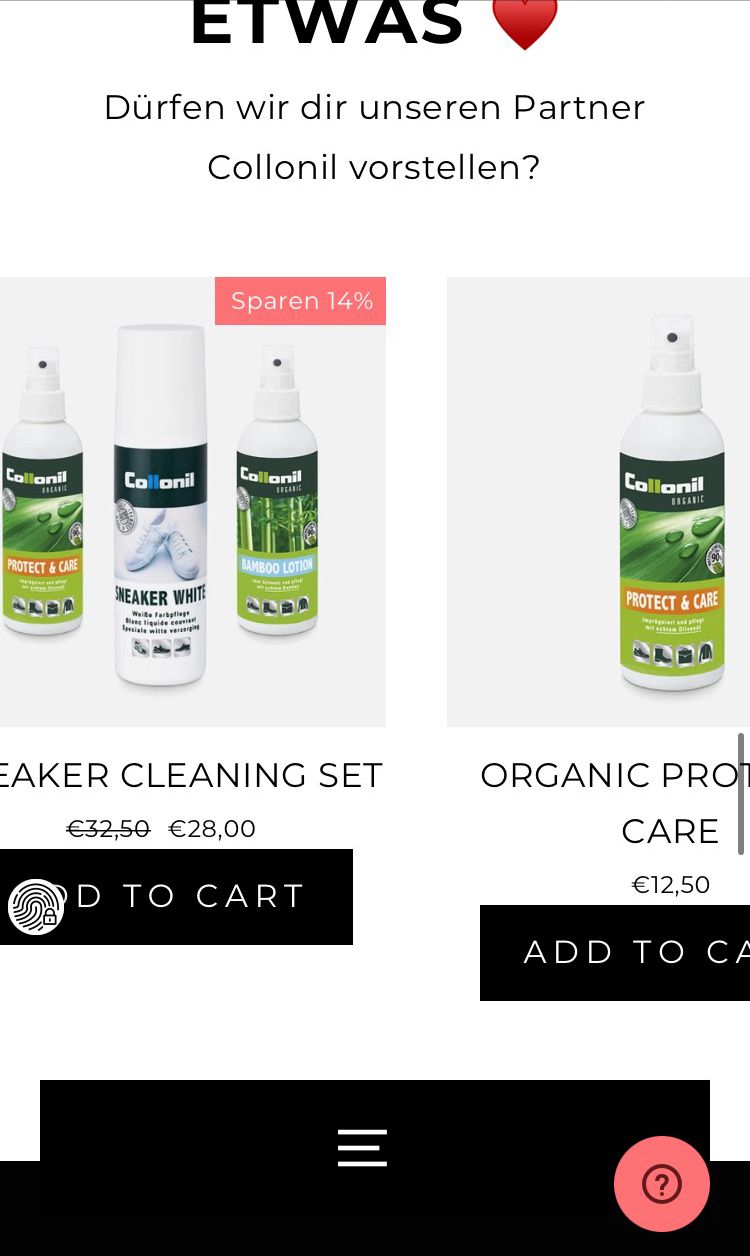
Hello, wondering if someone can help. I have added an add to cart to my clients website & was able to align all the buttons in desktop version, but mobile version (on phone, as using the desktop to preview mobile shows it correctly how I want it) is making them look huge, as well as is not aligning properly. You can see by the attached pictures the two areas I am having trouble with. Does anyone have a piece of code that will fix it. I have tried some solutions suggested in the forum (which is how I got it to work on Desktop) but they wont’ fix the mobile view.
Thanks!
1 Like
yes i can fix it just send me your website link so i can send you proper code to implement 
@shellbell
Please share your store URL.
Any help for this? Basically need it to look nice on mobile, but I can’t replicate what’s going on in my browser to be able to fix it.
1 Like
@shellbell
I checked your website with the following URL but in mobile view it shows single product.
https://www.4wa-berlin.de/collections/sneaker
@dmwwebartisan did you use an actual mobile device or just the browser on mobile view. Because the browser mobile view shows as one, but my phone shows two rows. I should mention it is on the homepage featured collections having this issue and not the normal collections. Thanks!