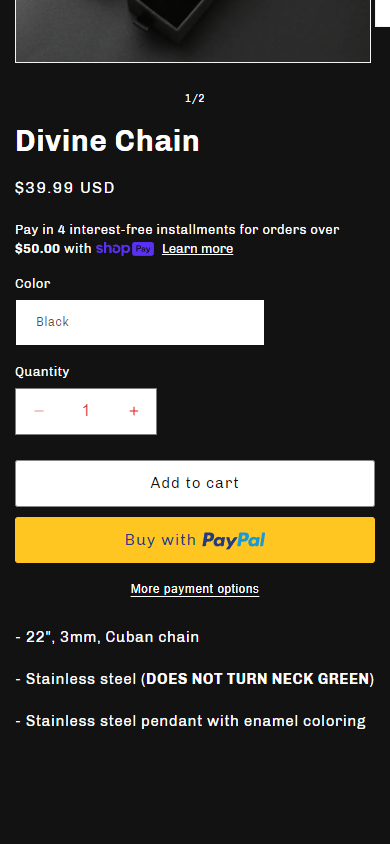
How can I fix the color of the quantity box color in dawn theme?

Topic summary

Issue: Quantity selector background color in the Shopify Dawn theme appeared differently on desktop (white) vs. mobile. The requester wanted consistent styling and referenced screenshots showing the discrepancy.

Diagnostic step: A helper requested the store URL and password to inspect the theme setup. These were provided.

Resolution: Adding a CSS rule to the theme’s stylesheet fixed the appearance. Specifically, placing .quantity { background: #fff !important; } at the bottom of base.css (Online Store > Themes > Edit code) resolved the issue for the requester.

Alternative approach: Another contributor suggested adding code in theme.liquid above the closing tag, with step-by-step instructions and a screenshot. The actual code snippet was not visible in the post, but the method was noted as useful for future reference. Theme.liquid is the main layout file, and base.css is the theme’s CSS file.

Outcome: The problem was successfully resolved with the CSS change; no further action items or open questions remain.

Summarized with AI on January 16. AI used: gpt-5.

Hey guys,

I am having trouble changing the quantity box color on the dawn theme and was wondering if anybody knew how to fix this.

The photo with the white box is on the desktop.

This second photo is how it appears on mobile.

Does anybody know how to solve this? I want it to be black, so that I can make the red colored font, white.

Thanks!

-Zuck

Hi @KeirebuStudios

Please share your store URL

URL: keirebustudios.com

Password: Zuck

Thank you!

Hi @KeirebuStudios

Please add this code at the bottom of your base.css file in Online store > Themes > Edit code

.quantity { background: #fff !important; }

It worked! Thank you so much :slightly_smiling_face:

1 Like

Hi @KeirebuStudios

This is Noah from PageFly - Shopify Page Builder App

Please add this code to your theme.liquid above the to get this solved

Step 1: Online Stores > Themes > More Actions > Edit code

Step 2: click on theme.liquid and paste the code above the


Hope this can help you solve the issue

Best regards,

Noah | PageFly

Thanks for the response, Noah!

Dan got it just before you, but this is just as helpful for future reference.

Hi @KeirebuStudios Let me know if you have any questions