Hi!
I’m all new to the shopify community and I hope you can help me.
I would like to insert an image in a Collapsible row on my product page (Sense theme):
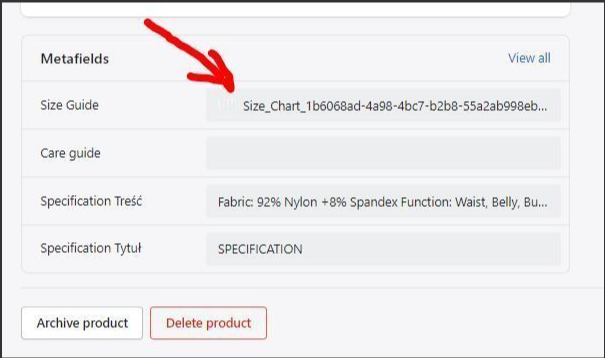
The image will be different for each product. I am aware that I have to use meta fields but I don’t know how to do it.
Thank you in a advance for your help 
Charlinej
This is PageFly - Free Landing Page Builder. I would love to provide my recommendations for your store.
Regarding your concern about adding the image in a collapsible row on the product page of the Sense theme
You should follow these steps below here:
Created a Metafield with the file as a content type:
https://prnt.sc/wx7rVW6-aybY
On the product page added a jpg file
Edited the main-product.liquid and replaced “richtext” with “liquid”:
Last step in the theme editor added a Collapsible Row with content as: product.metafields.my_fields.size_guide | img_url }}" alt=“Top Notes” width=“530”>
This row content here is dependent on the image you added and the metafield you have created for it
Hope this helps.
Best regards,
PageFly
hi!
thank you for the answer but it does not work 
“<” is missing at the begin of the liquid code.
still not working
Just to be sure : I have to type <product.metafields.my_fields.size_guide | img_url }}" alt=“Top Notes” width=“530”> in the collapsible raw content in the theme editor, right ?
I have the same problem same theme. Don’t you just love it when someone uses a cheap workaround that really isn’t quite the right way to do it on another theme and recommends you do it to yours?
Rather than replacing “richtext” with “liquid”, I copied and pasted then modified. Now I have the option to do text and/or…something. Had to make a small tweak to the schema, but that part was easy. The Settings console under custom data defines ours as product.metafields.custom.X , so “custom” not “my_fields” like in their theme. Even still I can’t get it to work!
Isn’t there a way to modify the liquid field to have a “dynamic source” button like the text block? That’s what I’d really like rather than having a messy bit of code in my theme window like a lazy slob instead of in the tucked inconspicuously in the code where it belongs.
Now I’ve added the following code to collapsable-content.liquid(1) after the “richtext” section like I did with adding the liquid section in the main-product.liquid(2)
(1)
{
“type”: “image_picker”,
“id”: “image”,
“label”: “t:sections.collapsible_content.blocks.collapsible_row.settings.image.label”
},
(2)
{
“type”: “image_picker”,
“id”: “image”,
“label”: “t:sections.main-product.blocks.collapsible_tab.settings.image.label”
},
In the default schema I added under collapsible content [line 1713 for mine]
“image”: {
“label”: “Row Graphic”
},
I now have a box in my theme editor where I can select the image as a dynamic source metafield input. Even with it selected in the theme editor, the image does not show up on the site. This method does allow you to select from your image library without using a dynamic source; if all your products under that template would use the same image. However, even after selecting from my library, it still does not populate to the live site. At this point, I have no clue why it’s not working. The metafield or image are selected and saved in the theme editor, but they don’t actually show up on the page!?