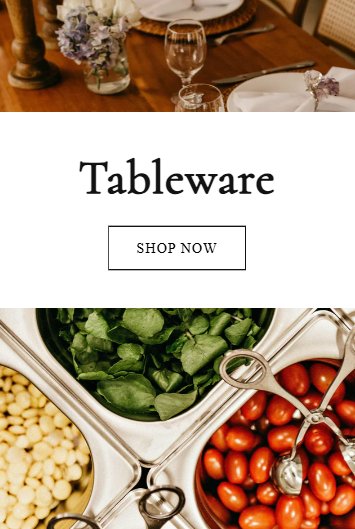
I want to have a custom css code that makes the image banner label button to be outline style only on mobile, and not on desktop,like shown below


the url is https://cheffings.net/collections/all
I want to have a custom css code that makes the image banner label button to be outline style only on mobile, and not on desktop,like shown below
the url is https://cheffings.net/collections/all
Hi @lukafernada
Please share the store URL or the current theme you’re working on. I know your store URL, but I can’t see the banner matching the picture you posted.
@lukafernada can you please share this page link?
Hi @lukafernada , kindly provide your store URL please and if it is password protected, please share the password as well. Thanks
Hi @lukafernada can you share store url?
Hi @lukafernada
You can try to follow this step
Step 1: Go to Edit code
Step 2: Find file base.css and add this code at the end of the file
@media (max-width: 768px) {
a.button.button--primary {
    background: #fff !important;
    color: #000 !important;
}
}
Result
Best,
Liz
@lukafernada please add this css to the very end of your base.css file and check,
Shopify Admin → Online Store ->Theme → Edit code → base.css
@media screen and (max-width:749px){
.banner__buttons .button{background-color: #fff; color: #000;}
}
If my reply is helpful, kindly click like and mark it as an accepted solution.
Thanks!
Hi @lukafernada
@media(max-width:768px){
.banner__box.content-container.content-container--full-width-mobile.color-background-1.gradient .banner__buttons a.button.button--primary {
    background: #ffff !important;
    color: #000 !important;
}
}
Result:
If my reply is helpful, kindly click like and mark it as an accepted solution.
Thanks!
Use our Big Bulk Discount app to boost your sales!  (https://apps.shopify.com/big-bulk-discount). Easy to set up and perfect for attracting more customers with bulk discounts. Try it now and watch your revenue grow!