Hello ,
The price in bold font
Website:https://www.auntclothing.com/collections/tshirt
Password:auntsoon
A user seeks to make product prices display in bold font on their Shopify store (auntclothing.com). Multiple solutions are provided:
Common approach:
base.css or theme.scss file in the Assets folder.price { font-weight: bold !important; }Alternative method:
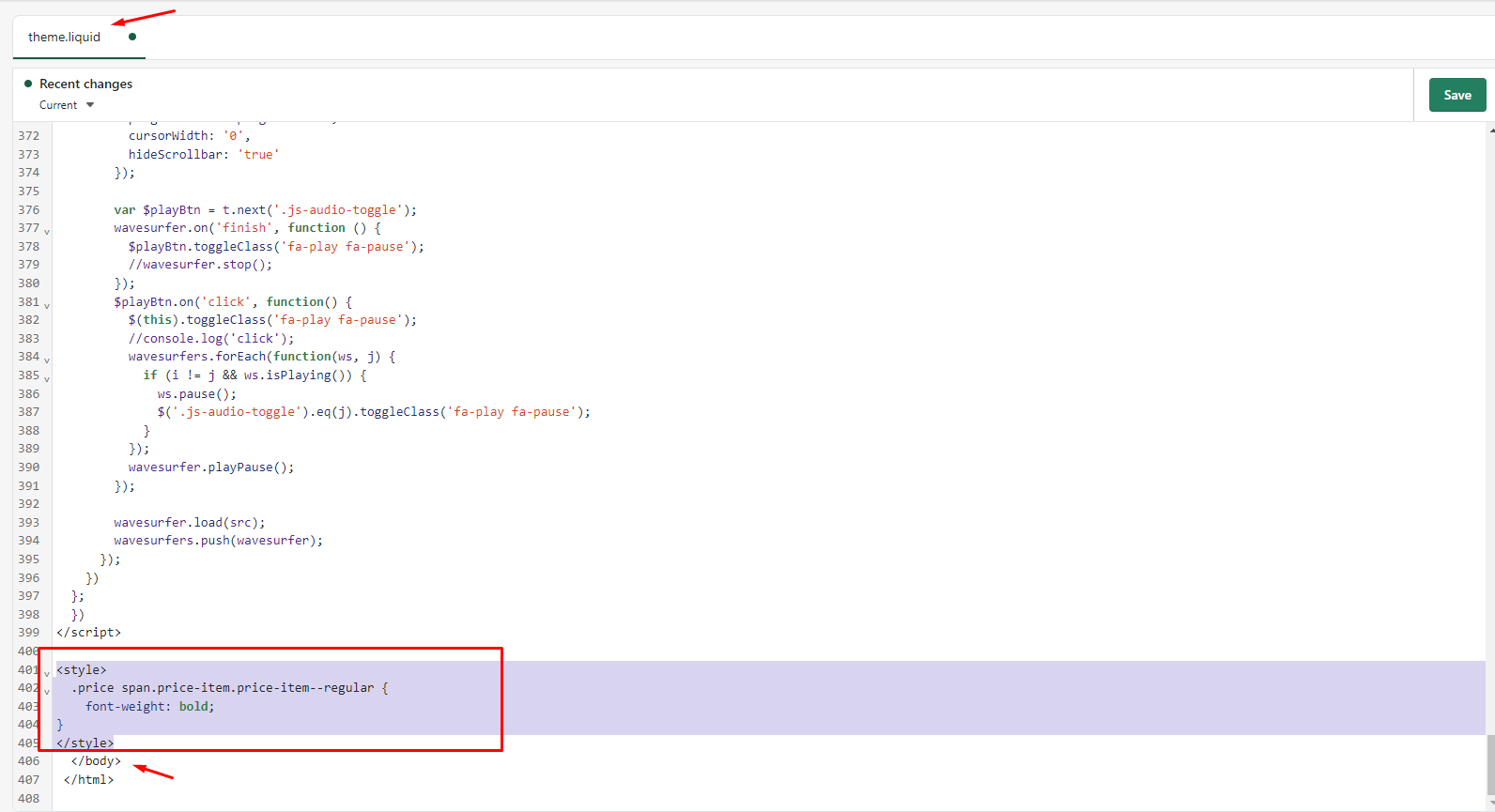
One responder suggests adding custom CSS via the theme.liquid file before the </body> tag.
Additional question:
A follow-up inquiry asks about making the vendor name bold (using Dawn theme), but no solution has been provided yet. The discussion remains open on this secondary issue.
Note: Several posts contain reversed/garbled text, but the technical solutions remain clear and consistent across responses.
Hello ,
The price in bold font
Website:https://www.auntclothing.com/collections/tshirt
Password:auntsoon
How can I make the price (80 EUR) IN Bold
Hello -
click on ONLINE STORE
on right select the ACTIONS drop down or the 3 little dots to the left of the CUSTOMIZE button and select DUPLICATE to make a backup of your theme
select this same drop down and select EDIT CODE
scroll down on left and click on ASSETS
depending on your theme, there is a file called base.scss or theme.scss or theme.css - something like that. Select it
code will load on right
scroll ALL THE WAY DOWN TO THE BOTTOM OF THE FILE on the right and put in
.price {font-weight:bold;}
 Then SAVE top right.
This will make the price BOLD throughout the entire website.
Hello @Zakariatheguy 
In Shopify Admin, you can go to Edit theme code, open file base.css and add this code at the bottom
.price {
    font-weight: bold !important;
}
The result
Hope that helps!
Hi @Zakariatheguy ,
This is Victor from PageFly - Advanced Page Builder App.
You can try with this code:
Please follow this:
Step 1: Go to Online Store->Theme->Edit code.
Step 2: Search file base.css.
Step 3: paste below code in bottom of file → save.
.price {
font-weight: bold !important;
}
Hope that my solution works for you.
Best regards,
Victor | PageFly
Hello @Zakariatheguy
You can follow these steps:
I hope the above is useful to you.
Kind & Best regards,
GemPages Support Team
working 2023 ..what about vendor?
Hello @Mkm2021
It depends on your theme. Can you send me the URL to the page?
i managed to change price to bold but vendor i can not find any solution
im using dawn theme