how can i change cart icon in my store?
theme : kalles multipurpose shopify theme
store : demostoreforcase2.myshopify.com
password : zialor
how can i change cart icon in my store?
theme : kalles multipurpose shopify theme
store : demostoreforcase2.myshopify.com
password : zialor
go to edit code >>> section >>> header <<< find this “pegk pe-7s-shopbag” this font icon
if you have change please your custom icon code
I found the code but dont know what to do?
Hi @abhi3764 ,
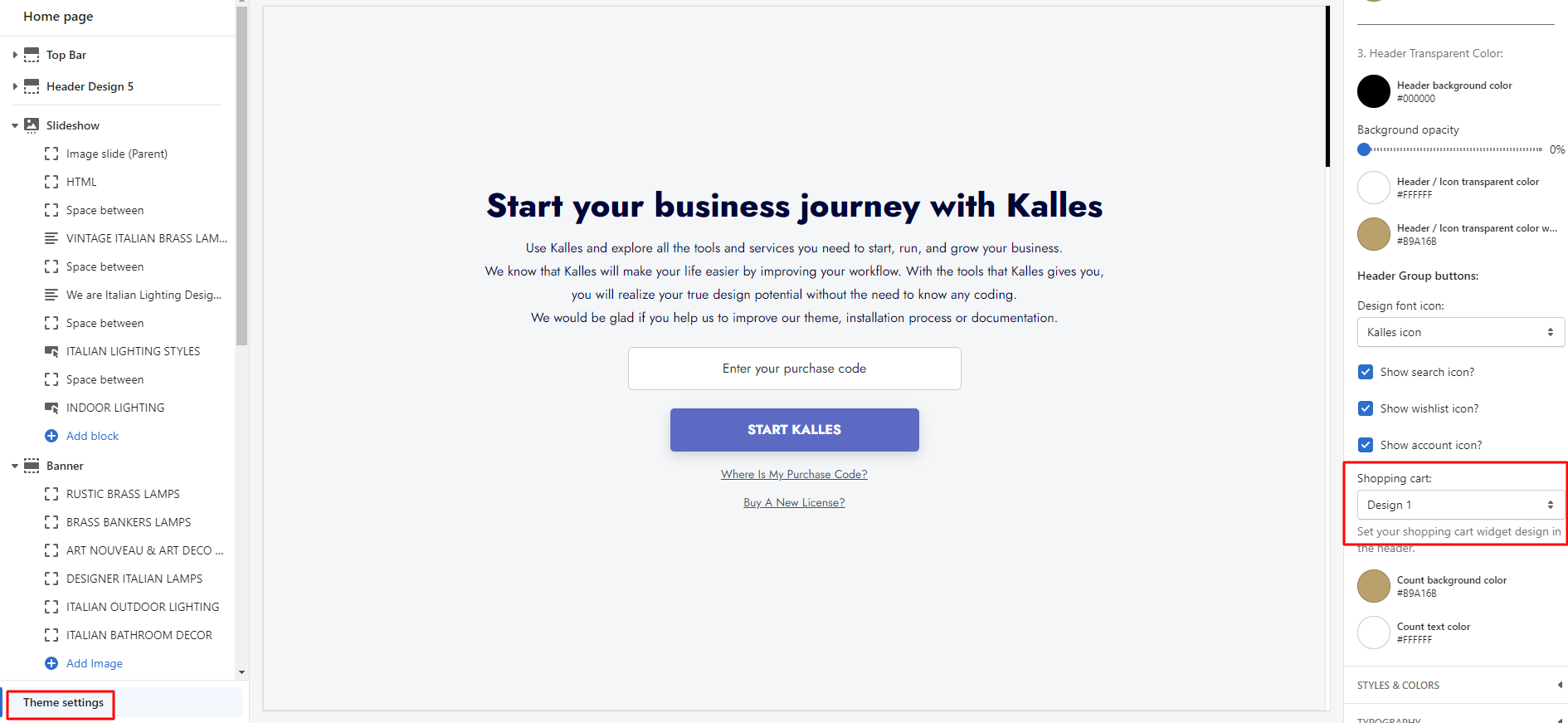
Please go to Customize > Theme settings > Header > Shopping cart.
You can choose the icon again here.
Hope it helps!
Thanks for your response, I’m using Kalles multipurpose theme,
I can’t find shopping cart section
can you please share header code
Hi @abhi3764 ,
Yes, my tutorial made for Kalles theme. You didn’t find this at Customize?
Please send me the code of the snippets/nt_group_btns.liquid file, I will help you check and change it.
Hi @abhi3764 ,
It is setting in Customize > Theme settings > Header > Shopping cart, refer:
have you tried this?
Yes, But i need to add my own custom cart icon!
Hi @abhi3764 ,
Please follow the steps below:
Code:
If it helped you solve your issue, please mark it as a solution. Thank you and good luck.
It doesn’t seem to be working…
Hi @abhi3764 ,
Please send your site and if your site is password protected, please send me the password. I will check it.
Hi @abhi3764 ,
Sorry, it was missing character ‘i’, please change code, it will work fine.
Hope it helps!