How can I personalize image sizes in the Dawn theme mega menu?

Topic summary

Topic: Adjusting image sizes in the Dawn themeโ€™s mega menu to avoid images appearing cut.

What was asked:

  • The store owner wants to personalize image sizes in the mega menu; uploaded images look cropped.

Proposed solutions:

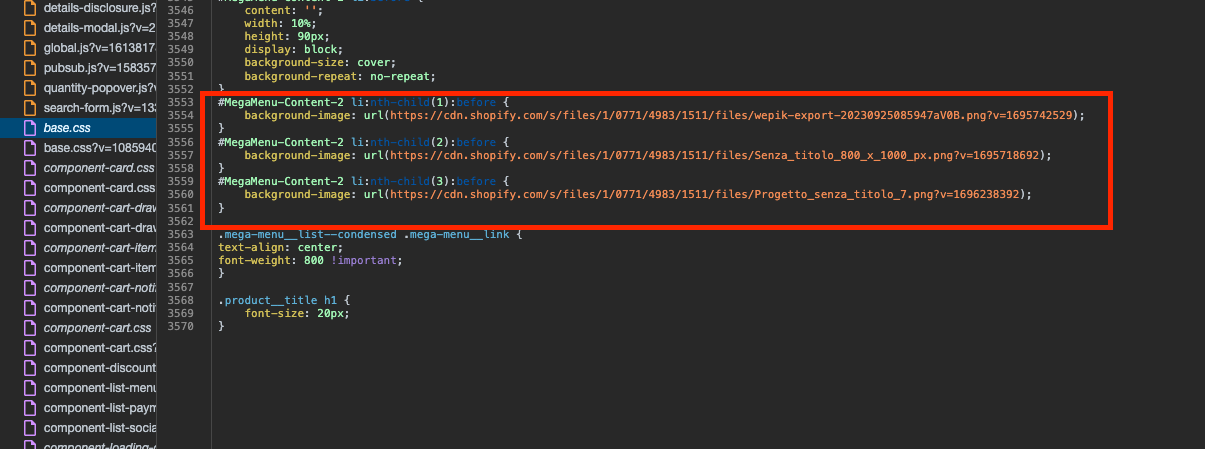
  • Initial guidance: Edit Online Store > Themes > Edit code > Assets > base.css and adjust the image reference in the indicated lines (shown in a screenshot).
  • Refined fix for cropping: Add to the bottom of base.css:
    @media screen and (min-width: 767px) {
    #MegaMenu-Content-2 li:before {
    background-size: contain !important;
    background-position: center;
    }
    }
    This targets desktop widths and centers the background image.

Notes:

  • Screenshots were provided to indicate where in base.css to edit and where to insert the CSS.

Status:

  • A concrete CSS snippet was provided; the original poster has not confirmed if this resolves the issue, so the thread remains open.
Summarized with AI on January 17. AI used: gpt-5.

hi, i would like to know how to change and personalize the size of the images in the mega menu

thanks for the support :slightly_smiling_face:

have a good day

website URL: https://drip-graffiti.com/

Hi @stra10

You can change it from your Online store > Themes > Edit code > Assets > open base.css file and change image link in those lines of code

hi, i just want to change the size , because when i upload the image , it remains cut

Please add this code at the bottom of your base.css file

@media screen and (min-width: 767px) {
#MegaMenu-Content-2 li:before {
    background-size: contain !important;
    background-position: center;
}
}