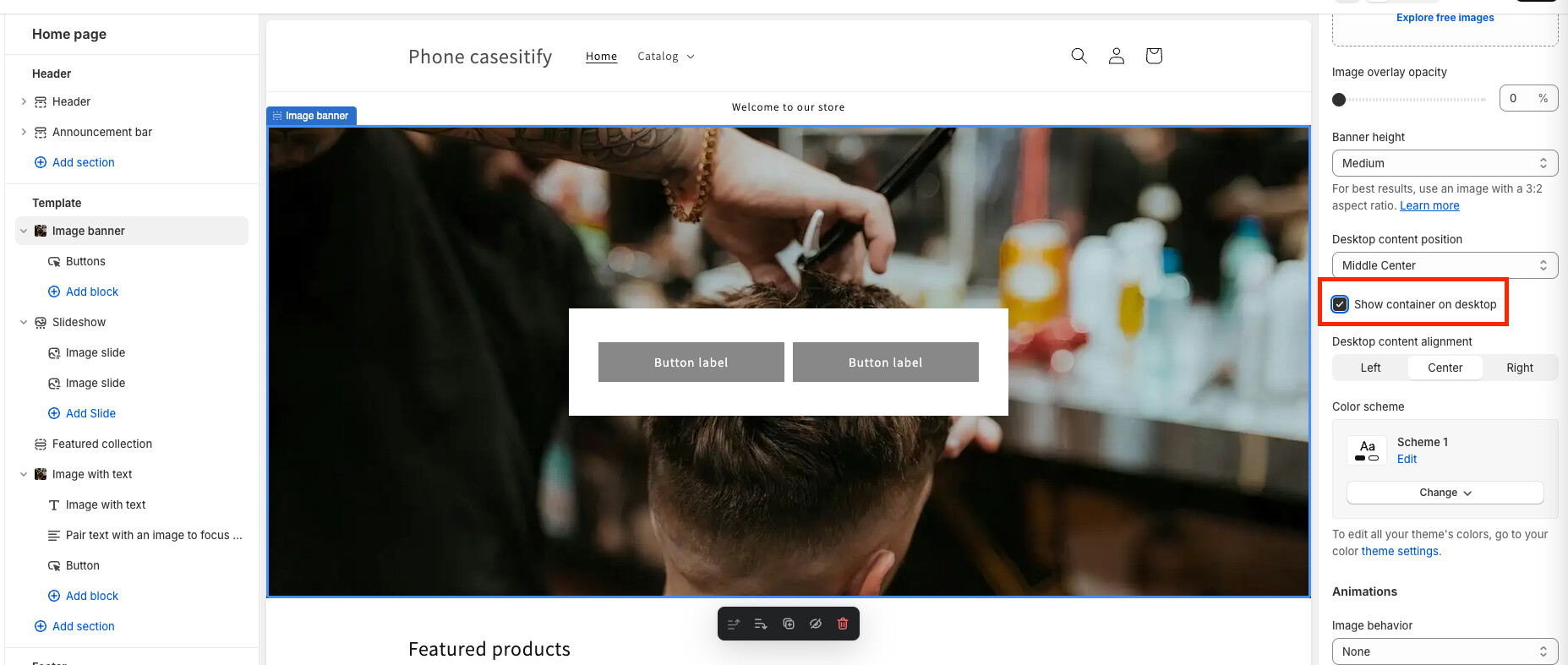
Hello! I encountered this problem while editing my website. How do I remove the white box behind the button on my image banner? I would like this to be transparent, just leaving the button I have in the middle. Thank You!

Hey @HallowedFaith
Welcome to Shopify Community! Can you share your Store URL so I can have a look on it? Also, if you have password enabled then please share the password as well. Your cooperation would be greatly appreciated.
Best Regards,
Moeed
Hi @HallowedFaith ,
Follow these Steps:
- Go to Online Store
- Edit Code
- Find theme.liquid file
- Add the following code just above tag
If you require further help to optimize your store, please don’t hesitate to reach out. If you find this information useful, a Like would be greatly appreciated. And if this solves the problem, please Mark it as Solution!
Best Regards,
Makka
1 Like
You can do that by unchecking option “Show container on desktop” in settings of that section
1 Like