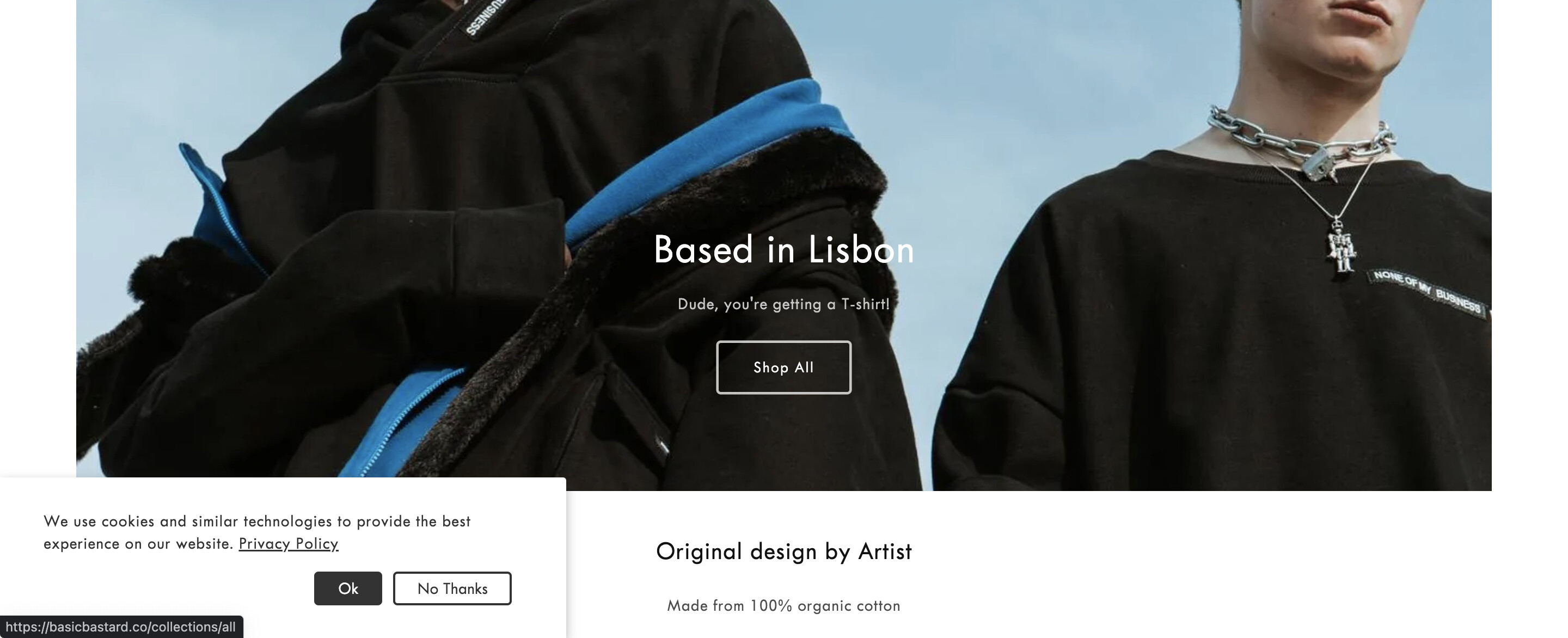
Hey guys, the size of the cookies banner has been changed to a smaller size. How can I get it back to normal? Much appreciated!
Topic summary
Cookie consent banner appears smaller than before and is inconsistently visible; some visitors don’t see it unless using an Incognito window. A screenshot is attached illustrating the reduced banner size.
Initial checks by others did not show the banner in normal browsing, prompting questions about whether it’s disabled and whether it’s coming from a theme default popup or an app. The origin (theme vs. app) remains unclear.
Suggested fix: add a CSS rule (width: 100%) to the cookie banner’s class to restore full width. CSS is the style language that controls layout and sizing; applying the rule requires targeting the specific banner selector in the theme or app.
Action items:
- Verify the banner in Incognito and identify its source (theme setting or a specific app).
- Locate the banner’s CSS selector and apply width: 100%.
- Confirm whether the banner is enabled for all users, not just private sessions.
- Test across devices/browsers after changes.
Status: Unresolved. Awaiting confirmation of the banner’s source and whether the CSS change fixes the sizing.
This is PageFly - Free Landing Page Builder. I would love to provide my recommendations for your store based on 6 years of providing solutions for about 100.000 active Shopify merchants.
Currently when I visit your page I don’t see the cookie accept message displayed, but you can fix the error you mentioned above by adding the css code “width: 100%” for the cookie banner class, hope this can be of help to you.
Let me know if this solves your problem or if you need further help!
If you feel my answer is helpful, like it or mark it as a solution. Let me know if you have any questions.
Best regards,
PageFly
Hi @basicbastardco ,
I checked and didn’t find the cookies banner, did you disable it?
Please use Incognito mode to see the banner. I don’t why it’s not showing as normal.
Hi @basicbastardco ,
Yes, I’m watching it with an incognito tab.
Is it displayed by the app, or is the theme’s default popup?
