Hi,
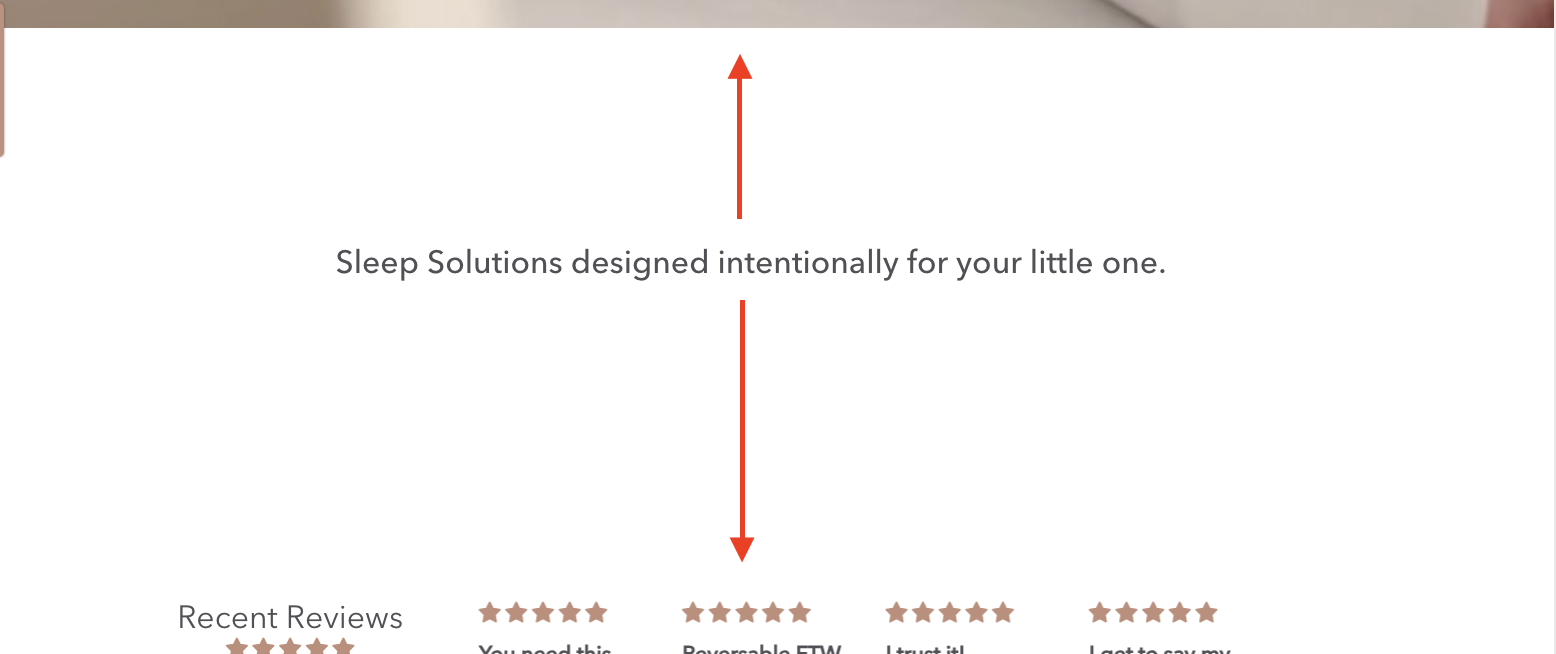
I’ve tried reducing the white space in the rich text sections and I haven’t been successful.
The red arrows indicate where I’d like to reduce the space.
Thanks
Hi,
I’ve tried reducing the white space in the rich text sections and I haven’t been successful.
The red arrows indicate where I’d like to reduce the space.
Thanks
Hello There,
Please share your store URL and password.
So that I will check and let you know the exact solution here.
Thank you…here’s the link
Hello There,
1.In your Shopify Admin go to online store > themes > actions > edit code
2.Find Asset >theme.scss.css and paste this at the bottom of the file:
.index-section {
padding-top: 30px!important;
padding-bottom: 30px!important;
}
Please add the following code at the bottom of your assets/theme.css file.
@media only screen and (min-width: 750px){
div#shopify-section-1621950118a15473c6 {
    padding-top: 0px;
    padding-bottom: 0px;
}
div#shopify-section-16219502147532ec95 {
    padding-bottom: 0px !important;
}
div#shopify-section-feature-columns {
    padding-top: 10px;
}
}
Hope this works.
Thanks!
This is great! Thank you 
Thank you for your response. It’s good to know that it’s worked for you. Kindly feel free to get back to me if you need any further assistance.
This also worked in the new Debut custom coding section for the specific rich text block where I wanted to do the same thing - perfect, thank you.
Hey there, not sure if this solution is outdated or I’m just outdated.  Either way, I’m having the same problem with massively excessive white space that I can’t get rid of. I tried to do the code you shared but it didn’t change anything (under assets>theme.css). Anyway, hoping you or someone can help tell me what I’m doing wrong so i can fix this. Thank you!