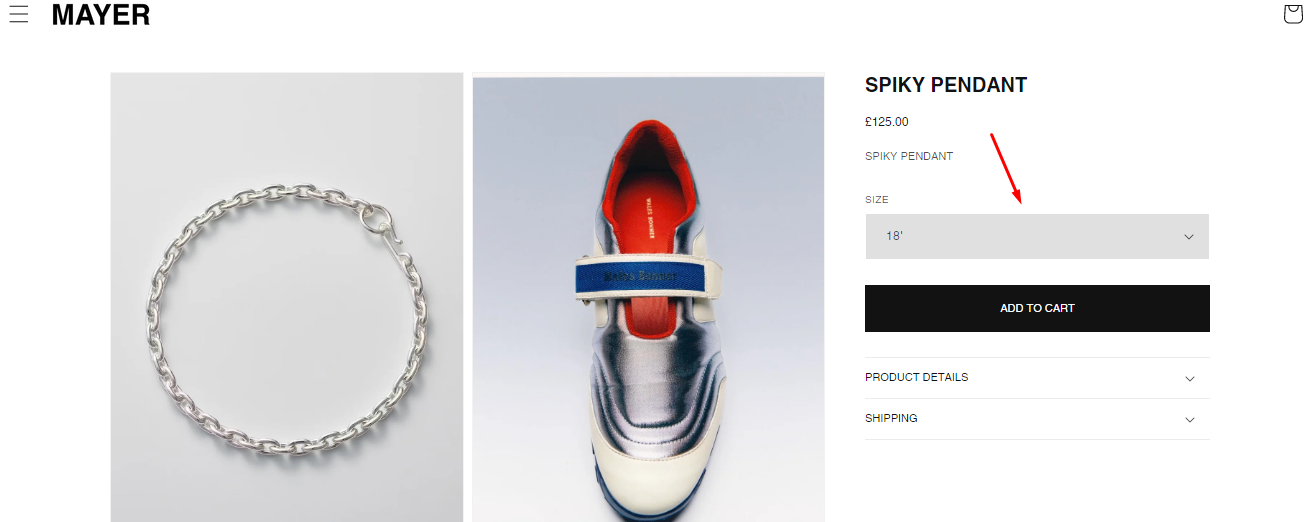
I want to change the background colour of a variant picker so the background is a different colour
Topic summary
Issue: A user wants to change the background color of a variant picker on their Shopify store.
Solutions Provided:
Two community members offered similar CSS-based solutions:
Method (from both responders):
- Navigate to Online Store > Themes > Edit code
- Locate the
assets/base.cssfile - Add custom CSS code at the end of the file
Key CSS snippets suggested:
.variant-selects { background-color: red !important; }(PageFly-Amelia).select__select { background-color: #e0e0e0; }(devcoders)
Both solutions target the variant selector element and allow customization by replacing the color value with the desired hex code or color name. The devcoders response also included additional CSS for removing box shadows and outlines on focus states.
Status: Solutions provided; awaiting user confirmation if resolved. Screenshots were included in responses to illustrate the changes.

1 Like
Hello @PM98
This is Amelia at PageFly - Shopify Advanced Page Builder app.
You can try the following steps I have provided to help you solve the problem you are facing:
Step 1: Online Stores > Themes > Edit code
Step 2: Choose file base.css
Step 3: Add code
variant-selects {
  background-color: red !important;
}
Hoping my solution helps you solve your problem.
Best regards,
Amelia | PageFly
Hi @PM98
Go to Online Store, then Theme, and click on Edit code.
Locate the file assets/base.css, and paste the code provided below at the end of the file.
.select__select {
background-color: #e0e0e0; /* Change 'your-desired-color' to the color you want */
}
.product-form__input.product-form__input--dropdown ::after {
box-shadow: none!important;.field:
after, .select:after, .customer .field:after, .customer select:after, .localization-form__select:after;
}
.product-form__input.product-form__input--dropdown:focus {
outline: none;
}
.field__input:focus, .select__select:focus, .customer .field input:focus, .customer select:focus, .localization-form__select:focus.localization-form__select:after{
box-shadow: none!important;.field:
}