A user working with Shopify’s Dawn theme is trying to locate where the CSS class copyright__content is defined. The class appears in footer.liquid but its styling rules aren’t found in the expected base.css file.
Key developments:
Initial searches in base.css, theme.css, and styles.css yielded no results
Another user offered collaborative access to investigate directly
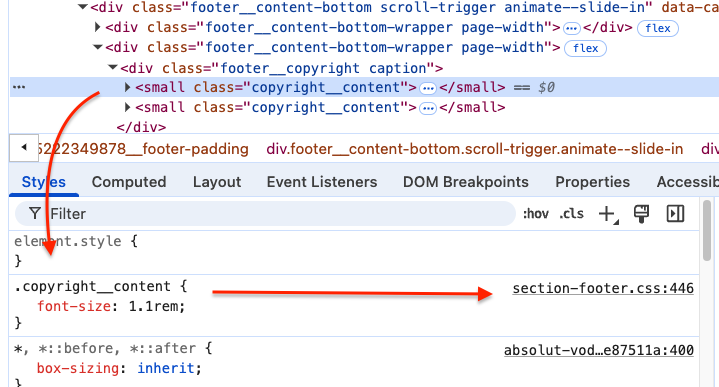
Resolution: The class was found defined in section-footer.css
Technical insight provided:
Modern Shopify themes don’t use a single stylesheet
CSS rules are distributed across multiple smaller .css files that load as needed
Browser “Inspect element” tools can quickly identify where specific CSS rules are defined (screenshot provided)
The issue was resolved through direct collaboration, revealing that Dawn theme organizes styles by section rather than in one central file.
Summarized with AI on October 29.
AI used: claude-sonnet-4-5-20250929.
Hello! In my footer.liquid the class “copyright__content” is used. I would like to change the style of this class (e.g. change font color or size). However, in the footer.liquid this class is not defined. Thus, it must be defined in another code sheet. Where do I find the definition of this specific class and how do I generally find the definition of the classes (or are they all defined in one single code sheet that I have not find yet)?
Thanks for the superfast reply! However, in the file base.css the class copyright__content is not defined (a search for “copyright__content” resulted in 0 hits) and the other two css-files (theme.css and styles.css) are not existing. But the copyright__content must be defined somewhere! How can I find the definition of this class?