Hello everyone,
I am using the Alpha Serve Power BI Connector to build up a Power BI report for the owners of this shopify account. Everything works pretty well, but I can’t figure out which field I have to use to calculate the net sales. Shopify offers various fields to calculate the sales amount, but none of them matches 100% with the sales over time statistic shopify offers.
What is used there?
I found out that „presentmentMoneyAmount“ from the table „orders_originalTotalPriceSet“ fits really good, but it is not filled for every month.
I hope one of you knows the solution for this problem. Thank you and happy holidays.
Greetings
I haven’t used the Alpha serve connector but I used the one from Vidi Corp. Here is how I calculated net sales.
The following fields are needed in order to calculate net sales:
[line_item__quantity] – quantity including returns
[line_item__price] - product price before discount and returns.
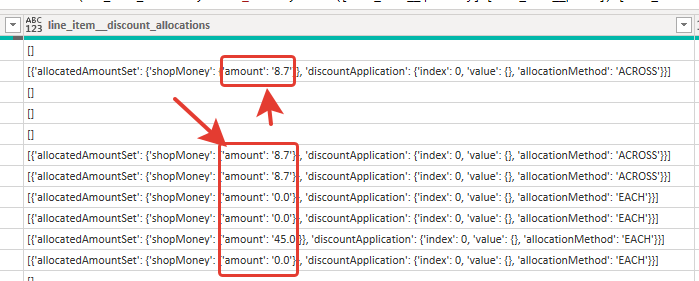
[line_item__discount_allocations] - JSON field from which you can get a discount for a certain product: [line_item__discount_allocations].[0].[allocatedAmountSet].[shopMoney].[amount] check screenshot below:
[order_refunds_net] – the total refund amount including tax
[order_refunds_total_tax] –total tax amount for the refund.
To calculate NetSales you need to multiply quantity * product price for every row of data and then subtract discount amount and refunds
There are complexities here because refunds are shown on order level rather than order line level which means you can’t allocate them to products. Sometimes you have partial returns. The only way of allocating refunds to product is to divide them between the products in this order.
This is not the cleanest way but it is approximately right
Вот формула: