I am using dawn, in the preview it shows an account (login, logout) button between the search button and the shopping bag. I can’t seem to find anywhere where I have the choice to add it (it’s not there). I have successfully removed the search button (I have only one product) but I can’t find any code, including in this community’s answers to other people who are having the same trouble, how to add a button in that spot so that my customers can logout if they choose to. The only place there is a logout is in the checkout page and I don’t see any recognizable code there to help.
Hello @harry39
Add the following HTML at the above cart icon. Follow the following steps ->Theme → Edit code → Sections → header.liquid
{%- if customer -%}

       {% render 'icon-account' %}

{%- endif -%}
Output:

If you find our reply helpful, please hit Like and Mark it as a Solution.
An award-winning North American Shopify Development Agency That Delivers Powerful Results, Innovation, and Secure Digital Transformation.
No doubt this has got me on the right track. Sorry, I did only ask for code to add a logout button.
That code only shows the icon when already logged in, there is no hover to show text and it doesn’t show when someone is not logged in and I would like new customers to see that option. Right now the customer must get as far as checkout to see login.
I would also love it if I could show text beneath the button with the customer’s name.
Providing I placed that in the right place (I found the script you show at line 560 at line 640 in my headeer.liquid) what does it mean in the script above it which I can’t see on your screen shot above. That if script starts with:
{%- if shop.customer_accounts_enabled -%}
That sounds to me like I would need to enable the customer account however I find no such function in the store.
Hi @harry39 ,
You need to use this code for logging out customer:-
{% if customer %}
{% endif %}
Hope it’ll help you.
All the best,
CedCommerce
1 Like
It’s not the code that I am having trouble with. it’s where to put the code. I have had results with the placement and code from webdesksolution above however not the result I was looking for. My customer must be logged in to see the icon. I want what most websites have, an account icon which clicked takes the customer to a logon page or to a logout page if they ae already logged in and I want it to show upon entering the store, logged in or not.
There must be some code in either the theme.liguid or the header.liquid which is keeping the icon from displaying until the customer is already logged in.
Hello @harry39 ,##### ##### Thank you for reaching out to us.
You need to enable customers on your website from the checkout settings.##### Follow the below steps to fix the issue,##### Go to your Shopify admin > Settings > Checkout & accounts.##### Now scroll down, and you will find the section as shown in the below image.##### Then click on edit > make changes and save it.#####

##### image.png#####

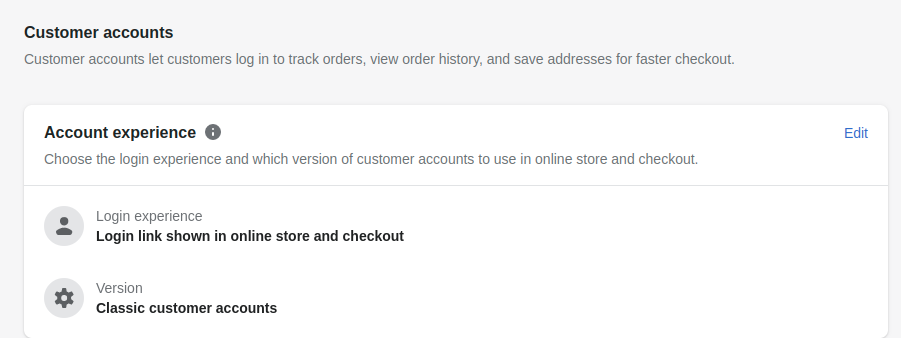
##### image.png##### ##### Let us know if you have any further questions.##### ##### Regards,##### CedCommerce

I cannot believe how many times I clicked around and never thought to click the edit button in account experience. Hindthought is that it should have been obvious. I’m going to blame it on fatigue. Thanks a million. If you added a tip jar button here, I’d be happy to tip.
Before I click the accept solution button (because I don’t know if that closes out this discussion), I’d love it if Dawn had the capacity to show the customer’s name when logged on. Is there a simple code addition for that?
As of right now, the account button is not showing up on my phone. It does on my desktop. Even when I am in customize, if I click mobile, it does not show up. I’ll respond again if I figure it out.
OK. So, in mobile (and on my phone) the account icon/login/logout switches into the bottom of the hamburger menu. I’m not going to say I love that idea, but I am just happy that it’s there.
At this point the only question remains is to whether there is a code for dawn (or any other theme) which displays the customer’s name when logged in?
I figured out the customer’s name adding to header. Thanks for all your help.
1 Like