How to add the variant name on top of the variant picker thumbnails? (Dawn theme)

Topic summary

Goal: show the selected variant’s name next to the “Color” label in Dawn, updating dynamically as different color thumbnails are clicked; add a second variant picker as a dropdown below the color thumbnails. The request includes a site link and reference images illustrating the desired UI.

Latest update: one responder states this requires custom theme changes involving JavaScript and Liquid (Shopify’s templating language), and shares an example screenshot. No code or step-by-step solution was provided; they recommend working with a developer and offer assistance.

Key concepts:

  • Dawn theme: Shopify’s default storefront theme.
  • Variant picker: the UI control to select product variants (e.g., colors, sizes).
  • Liquid: Shopify’s template language used to render dynamic content.

Outcome and status:

  • No implementation details or confirmed fix yet.
  • Suggested action is to engage a developer for JS and Liquid customizations.
  • Thread remains open with the main question unresolved.

Notes: Images are central to understanding the intended layout and behavior; no code snippets were shared.

Summarized with AI on December 23. AI used: gpt-5.

Hi,

I need help with adding the variant name of my products beside the “color” text. It should appear when I click on the variants of my products and change accordingly when I click on other colors.
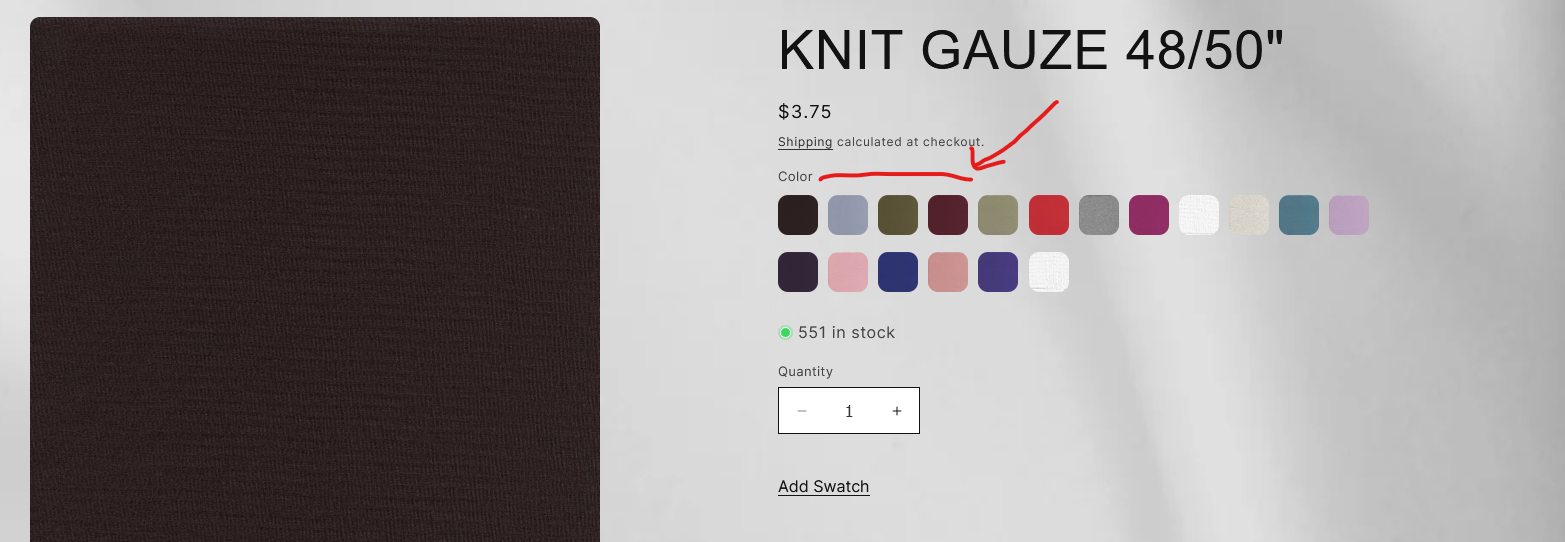
Additionally, I want to add an additional variant picker in the form of a dropdown below the color thumbnails.

Here is my website for reference: https://www.fabricapparel.com

Hope you could help me out! Thank you.

Hello @kay_png

Welcome to Shopify Community.

Your requirement requires custom coding including JS and liquid tweaks. Here is an exmaple:

I would recommend to consult a dev to make changes in your theme.

Let me know if you need one.

Thanks